Learn Markdown in 3 Minutes: Don't Get Derailed by HTML Anxiety
There's been a big uproar over Anthropic suggesting HTML as a replacement for Markdown. My advice is that you really should learn Markdown, because it takes only 3 minutes to get the hang of, and it performs no worse than HTML!
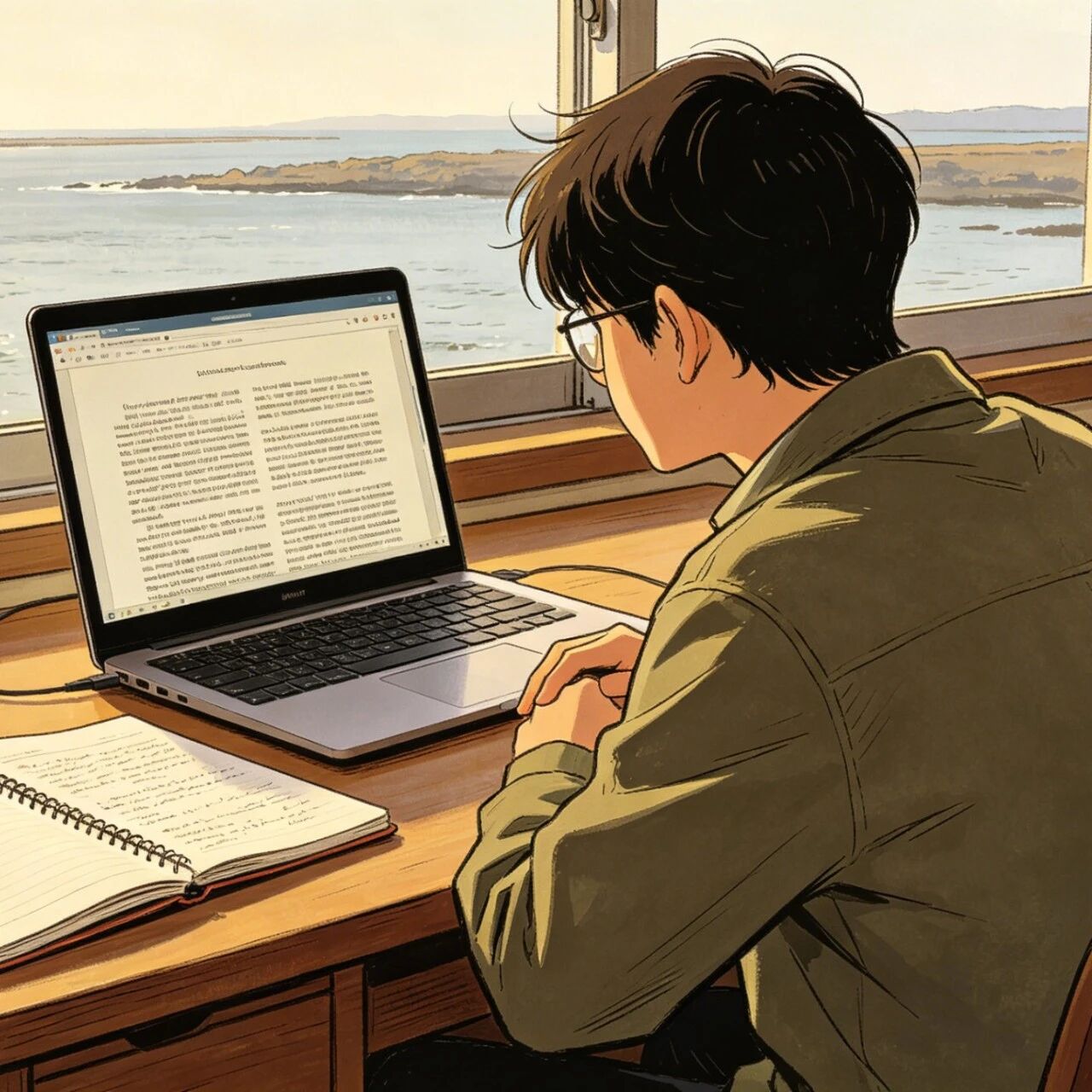
When you write a document in Word, this is the scene you hit all the time: you spend the better part of an hour on layout. Then your boss gives a few comments, you change one font size, and the alignment of the whole document falls apart; and that pasted code block has all its indentation drifting.
Later I switched to Markdown files, and I haven't opened Word for a single second since.
That was the first time I realized: a good writing tool should let you focus on the content itself, not the layout.
## So what exactly is Markdown?
In one sentence: a syntax that lets you write structured documents in plain text.
You don't need to click toolbars with the mouse, you don't need to memorize Word's style hierarchy — you just insert a few symbols as you type:
# This is a level-one heading
## This is a level-two heading
### This is a level-three heading ...

- This is a list item
1. This is an ordered list

*This is italic*
**This is bold**
`This is code`

> This is a quote
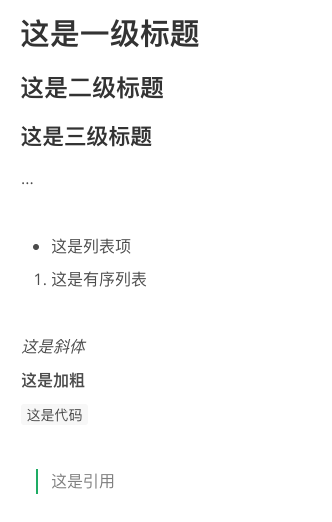
That's really all there is to it.
## Beyond text
Recently Anthropic suggested replacing Markdown with HTML, on the grounds that HTML is more expressive and its styling more controllable.
But Markdown itself is not weak. Beyond text, it also supports extensions such as images, tables, flowcharts, and math formulas. Not every editor natively supports flowcharts and math formulas, but tools like Typora and Obsidian ship with rendering engines built in, so they're easy to write.
1. Images
The basic syntax for inserting an image in Markdown is simple:

// If it's an online image, put the URL.
// If it's a local image, put the relative path.
In my day-to-day work, what I use most is the relative path to a local image
.md

That way, when the document is moved somewhere else, as long as the images move with it, the references won't break. Far better than Word's "images are embedded in the file and vanish the moment you paste" experience.
2. Tables
Markdown's table syntax is also simple and easy to remember:
| Tool | Purpose | Difficulty |
|------|------|------|
| Typora | Local writing | Low |
| Obsidian | Knowledge management | Medium |
The second line is
---|---
3. Flowcharts (Mermaid syntax)
Drawing flowcharts in plain text makes them especially easy to change:
graph TD
A[Start] --> B{Decision}
B -->|Yes| C[Run A]
B -->|No| D[Run B]
C --> E[End]
D --> E
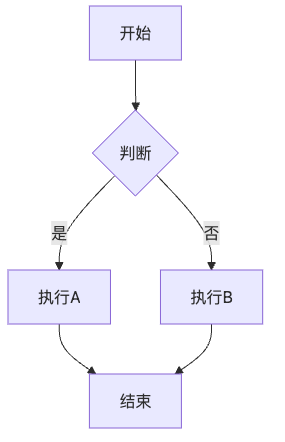
What it renders is a flowchart that goes from "Start" to "Decision" and then out to the different branches. The best part is — when you need to change it, you just edit the text; no redrawing boxes, pulling lines, or nudging things into alignment.
4. Math formulas (LaTeX syntax)
When writing technical documentation or data analysis reports, formulas are easy to write in Markdown too:
Inline formula: $E = mc^2$
Standalone formula:
$$ \int_{-\infty}^{\infty} e^{-x^2} dx = \sqrt{\pi} $$
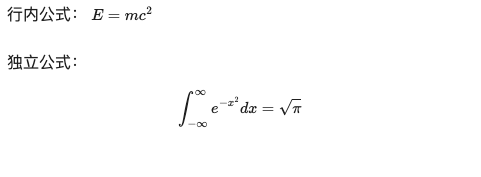
Once rendered, it's standard mathematical typesetting. If you write algorithm documentation, data reports, or study notes, this feature can save you 90% of the time you'd spend on formula layout.
None of the above is syntax you must learn; just look it up when you actually need it.
In short, it is nowhere near as bad as the self-media hype suggests these days. Markdown has plenty of use cases, and it can express non-text content too.
## Three small tips
1. Specify the language on code blocks
Many people write code blocks with just three backticks, but adding the language name makes an enormous difference to how it renders:
// No language specified — plain text, no highlighting
console.log('hello')

\```javascript
// Specified — syntax highlighting
console.log('hello')
\```
For technical people, this detail directly affects the reading experience.
2. Build a table of contents with anchor links
Add a table of contents to a long document and the reader's experience goes up a notch:
## Table of Contents
- [Background](#背景)
- [Approach](#方案)
- [Summary](#总结)
## Background
...
## Approach
...
## Summary
...
This way, readers can click through the table of contents to jump to a specific section.
3. What if an image is too big?
Markdown itself doesn't support resizing images, but you can get around the limitation with HTML's <img> tag (most Markdown renderers are compatible with it):
<img src="./diagram.png" width="600" alt="architecture diagram">
Which tool should you pick?
This is the question I get asked most. My advice comes in three tiers:
- Absolute beginner: MarkText WYSIWYG — you type # and it becomes a heading, with almost no learning cost.
- Knowledge management: Obsidian / Notion Bidirectional links, well suited to building a personal knowledge base.
- Minimalism: VS Code + a preview plugin You're already writing code, so your editor is the best writing tool.
No tool is absolutely good or bad; just keep whichever one you've found most comfortable.
## The "anxiety" around HTML and Markdown
The uproar over Anthropic suggesting HTML as a replacement for Markdown has been loud. Some people have gotten anxious along with it: "Did I waste my time learning Markdown?" "Do I have to learn a whole new thing?"

My view is simple: don't panic, figure out the scenario first.
- HTML really is more powerful. Nested tables, custom styles, interactive components... anything Markdown can't do, HTML can. If your document needs complex layout (a product manual, say, or a multi-column design), HTML is the better choice.
- But Markdown was never positioned as "the strongest" — it's "the fastest." You use plain text to quickly write a clearly structured document. For everyday writing, notes, technical documentation, and blogs, Markdown is already more than sufficient.
Anthropic's suggestion is more likely aimed at some specific scenario, such as AI generating fancier content for humans to look at (humans are visual creatures, after all). But good Markdown can actually deliver a decent reading experience too.
On that basis, people can't help speculating that the bigger purpose of Anthropic's suggestion may be to consume more of everyone's tokens.
So don't get derailed by the "manufactured anxiety" discussion!
If writing a note means you still have to think about <div> and <style>, then the barrier to writing actually goes up. Markdown's value is that it lets you forget the layout and focus on the content.
Abandoning Markdown to hand-write HTML is obviously not the right move. It's like a painter throwing away the brush just because cameras exist — tools serve the scenario, not the other way around.
Related posts:
Git Worktree: The Secret Weapon for Parallel Development with AI Coding Agents
A Guide to AI Agent and Git Collaboration: From Code to Documentation
More Controllable AI Coding: GitHub's Own Spec-kit Walks You Through a Smooth Development Flow
If you found today's post useful
why not tap "Like" or the "heart" to support the author
or drop a comment below and share your thoughts