An AI Agent and Git Collaboration Guide: From Code to Documentation
Collaborating efficiently with AI starts with using Git well. This article explains why Git is the essential safety net for an AI Agent managing code, documentation, and config, and lays out a complete guide—from core concepts and hosting platform choices to a hands-on workflow—so you can direct AI with confidence and make every change traceable, reversible, and mergeable.
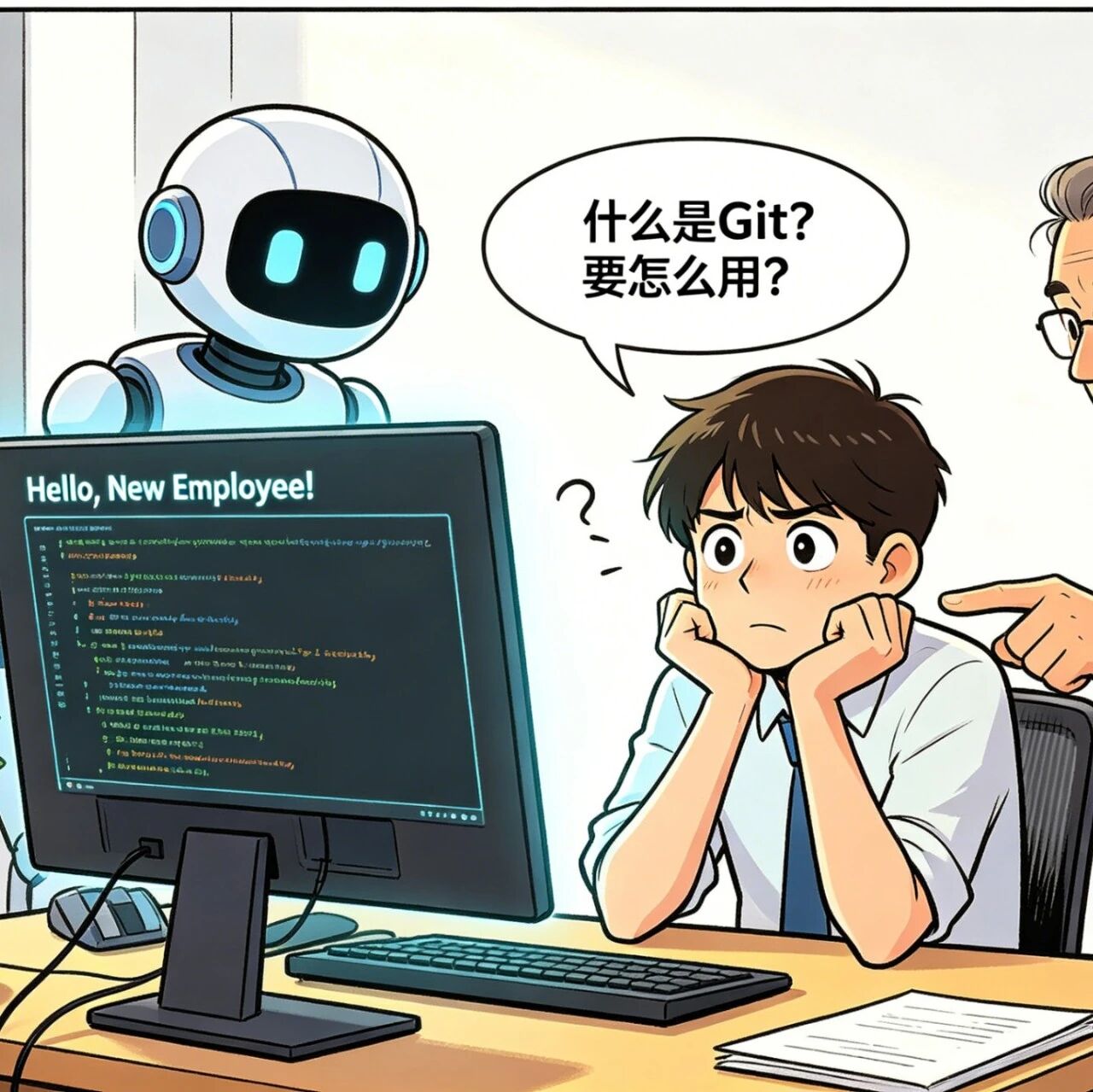
If you've just started working with AI Agents, you've probably heard one core piece of advice over and over: "put your project files under Git." But what exactly is Git? Why does every AI Agent that touches files need it? And how do you actually use it? This article is the answer.
We'll start from Git's basic concepts, move on to how an AI Agent uses it, and finish with a clear, practical collaboration workflow.
If you already have some background, you can jump straight to the "How an AI Agent collaborates with Git" section.
Why does an AI Agent need Git?
You might ask: why Git specifically? Can't I skip it?
In the AI Agent era, the answer is: without Git you can barely move. And that isn't limited to programming—it applies to any collaboration that involves creating and modifying files.
1. An AI Agent modifies files frequently and in bulk. You need a system that tells you clearly: what exactly did it change? Git tracks modified files effectively.
2. You need a safe undo at any moment. An AI Agent's output isn't always good. If the result isn't what you wanted, you need to roll back quickly. One git checkout and everything is restored.
3. "Branches" are what give you the nerve to experiment. Let the Agent try a new feature or draft a new chapter on its own branch; whatever the outcome, it won't pollute your mainline (e.g. the main branch). Not happy? Just delete the branch—no worrying about "not being able to get back."
Drawing the line: what shouldn't go into Git?
Git is not a universal storage bin. Putting the wrong things in it causes real trouble.
1. Big Files
Typical examples: high-resolution images, videos, design source files, datasets, trained model files.
The problem: Git stores every historical version of a file, which makes every clone and pull painfully slow and bloated.
2. Archives
Typical examples: .zip, .tar.gz, .rar files.
The problem: Git can't parse differences inside an archive. Every change is stored as a brand-new binary file, so you lose the whole advantage of version control.
3. Dependencies & Build Outputs
Typical examples:
- node_modules/, vendor/, venv/ (third-party dependencies)
- dist/, build/, .exe, .dll (compiled build artifacts)
- pycache/, .DS_Store (system or runtime caches)
The problem: dependencies can be reproduced exactly by a package manager (npm install, pip install), and build artifacts should be generated from source. Putting them in Git makes the repo explode in size, for no reason at all.
The fix: exclude them with a .gitignore file.
4. Secrets
Typical examples: API keys, database passwords, private-key config files (like the passwords contained in .env).
The problem: once accidentally committed to a public repository, that information is recorded permanently, easily scanned and exploited by automated tools, and turns into a security disaster.
The one-line rule:
Put "source code" and "text assets" (code, docs, config) into Git; let tools manage dependencies; and keep big files and secrets firmly outside Git.
The five core Git concepts
## 1. Repository
A repository is just a folder that Git has taken over and tracks.
Initialize a Git repository in the current folder:
git init
## 2. Commit
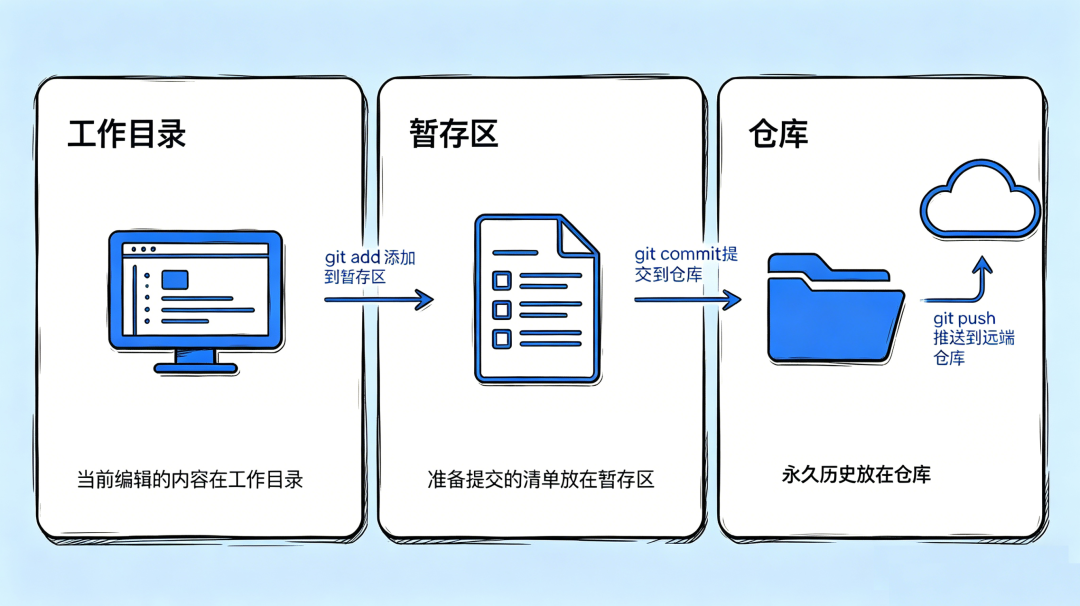
A commit is a complete "snapshot" of the project at a point in time—your safe save point. Every commit has a unique ID (like abc1234) and a description.
Mark all current changes as pending commit (put them in the "staging area"):
git add .
Package the staged changes into a permanent record point:
git commit -m "添加用户登录功能模块"
## 3. Branch
Branches let you run several lines of work in parallel within the same project without interfering with each other.
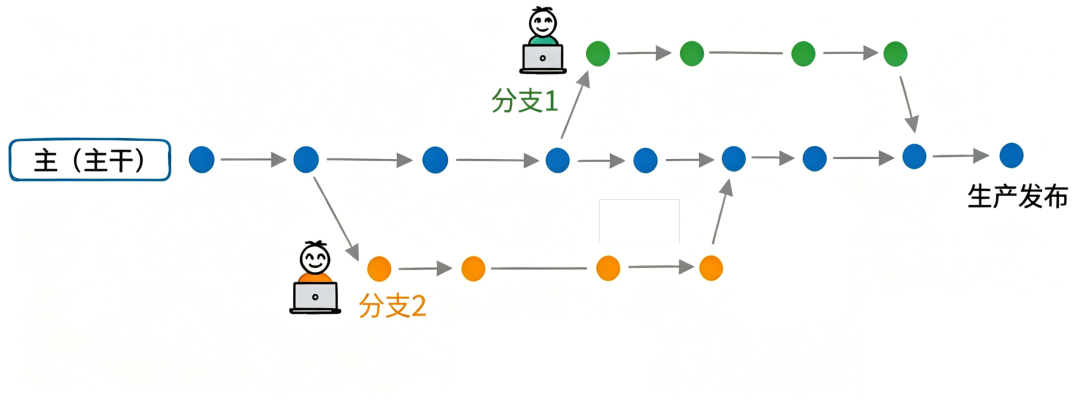
Create and switch to a new branch:
git checkout -b feat/user-auth
Switch back to the main branch:
git checkout main
Merge the feature branch's work into the main branch:
git merge feat/user-auth
## 4. Remote
A remote is a copy hosted in the cloud (e.g. GitHub, GitLab), used for backup, sharing, and collaboration.
Link a remote repository:
git remote add origin https://github.com/你的用户名/项目.git
Push local commits to the remote repository:
git push origin main
Pull the latest updates from the remote repository:
git pull origin main
## 5. Working Directory
That is, the project folder you see on your computer. All your changes happen here first.
How an AI Agent collaborates with Git
The good news: as of now (April 2026), mainstream AI development tools (like Claude Code and Cursor) all have native Git support built in.
You don't need to memorize complex commands—just issue instructions in natural language. Simply say: "git status," "create a branch docs/update-guide," "commit and push to the remote repository."
Typical instructions for an AI Agent
Starting a new task:
Please create a new branch feat/user-dashboard, then start implementing the user dashboard feature.
Checking status:
What uncommitted changes are there right now?
Reviewing changes:
Compared with the last commit, what exactly was changed?
Saving progress: (some Agents can fill in the commit message automatically)
Please commit all current changes, with the commit message 'finish the user data fetching API'.
Rolling back:
Undo the last change to the config file and restore it to the state of the last commit.
Switching context:
Switch to the main branch and take a look at the document structure of the live version.
Choosing your code hosting platform
Now that you understand the concept of a remote, the next practical question is: where should I host my code? Beyond the best-known GitHub, the major cloud providers each offer their own Git services, with different strengths.
GitHub: the benchmark for global ecosystem and community—no introduction needed, except that access is slow.
Cloud provider Git services: deep integration and compliance. For users or businesses in China, keeping repositories and cloud infrastructure under the same provider often delivers a better experience. Examples:
- Alibaba Cloud Codeup
- Tencent Cloud Coding
GitLab: strong self-hosted and enterprise solutions; the first choice for companies that need tight control over code security, private deployment, and DevOps pipelines.
Gitee: the largest open-source hosting platform in China, with a friendly Chinese interface; good for domestic open-source projects or as a mirror backup for GitHub.
## How to choose?
Look at ecosystem lock-in: if you lean heavily on one cloud provider's infrastructure (Alibaba Cloud or Tencent Cloud, say), choosing its companion Codeup or Coding can greatly simplify your DevOps.
Look at collaboration scope: if your project needs to connect with the international open-source community, GitHub is the obvious choice. If it mainly serves domestic teams or must meet data-localization compliance, Gitee or a cloud provider platform is the safer bet.
Look at feature needs: if you want a highly integrated, ready-to-use project management platform, a product like Coding fits better. If you only need core Git repository features plus a toolchain of your own choosing, GitHub or GitLab is more flexible.
As far as collaborating with an AI Agent goes, all these mainstream platforms provide complete Git HTTPS/SSH protocol support, so an AI Agent can operate them normally. Your choice comes down more to team collaboration, network environment, and the long-term ecosystem.
Hands-on workflow: Git operations in collaboration with an AI Agent
## Step one: project initialization
First create the project on the hosting platform.
Then clone the existing project from the cloud:
git clone https://github.com/用户名/项目名.git
Or you can just have the Agent do it:
Clone the remote repository https://github.com/用户名/项目名.git into the local xxx folder
## Step two: give the Agent clear instructions
Tell the Agent the goal and the boundaries clearly:
I want to add a user authentication module to the project. First create and switch to the branch feat/auth, then modify config.yaml and src/auth.py to implement basic login, and update the relevant notes in README.md.
The Agent will:
- Create and switch to the specified branch.
- Start modifying code, config files, or documentation.
- Report progress periodically.
## Step three: review the Agent's work
You can check it yourself:
git status #查看更改概况
git diff #查看详细的代码差异
Or just have the Agent report:
"Show all the changes made so far."
## Step four: decide—keep or discard
If you're satisfied:
"Good. Please commit these changes, with the commit message summarized as 'implement basic user login and config updates'."
The Agent will run git add and git commit.
If it needs redoing:
"This approach won't work. Please discard all uncommitted changes—let's try a different angle."
The Agent may run git checkout -- .
## Step five: consolidate the work
Once the feature is done, merge it back into the mainline:
git checkout main
Switch back to the main branch.
git pull origin main
Pull the latest remote updates (to avoid conflicts).
git merge feat/auth
Merge your feature branch.
git push origin main
Push the merged result to the remote.
Of course, you can also have the Agent do it for you:
Now merge the work on the feat/auth branch into main and push it to the remote repository.
Wrap-up
Git is the infrastructure for efficient, safe collaboration with an AI Agent. It comes down to five concepts: repository, commit, branch, remote, and working directory.
You don't need to become a Git command expert; just master this workflow:
- Put the project under Git (git init / git clone).
- Create a separate branch for each task and have the AI Agent work in it.
- Review changes regularly with git diff and stay in control.
- Let the Agent handle commits (with clear commit messages).
- Finally merge verified work into the mainline and push.
- Hold the line: never put big files, archives, dependencies, secrets, or build artifacts into Git.
With this workflow in hand, you can calmly direct an AI Agent to handle code development, documentation writing, config optimization, and more in parallel—each task running safely on its own branch, and finally assembled as elegantly as puzzle pieces. That is exactly the core working method of modern human-machine collaboration.
Related articles:
A summary of AI coding tools: the zero-background edition
After a quick run at spec-driven development, I found where it actually fits
Common AI application concepts explained: Agents, Skills, and MCP
More controllable AI coding: GitHub's own Spec-kit gives you a smooth development flow