Loop Engineering — the New Trend in AI Coding

Lately Silicon Valley has started hyping Loop Engineering again.
The big names have all jumped into the discussion, and the headliners are naturally the people of the moment: Peter Steinberger, father of the crayfish, and Boris Cherny, the leading figure at Anthropic (often referred to as "Company A").
The major tools are following suit. If you have Claude Code, Codex, Cursor, Reasonix or any other AI coding tool on hand, you can give it a try — the latter two are available in China.
Of course every vendor implements it differently. Some use a /loop command, others use a /goal command.
This is a screenshot of the /loop command in Cursor — you can see it supports running a task on a schedule:
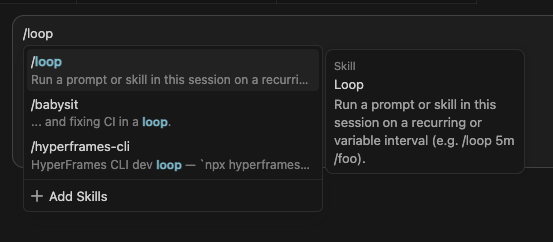
Put simply, loop engineering means having an AI Agent execute a task in a loop until the task is done. What makes it distinctive is that it pulls the human out of the AI's workflow and lets the AI complete the whole process on its own.
That said, the two people pushing this technology hardest are both big shots who burn dollars like paper. In the face of that kind of behavior, ordinary people like us still need to be careful.
There's also an article introducing loop engineering that's pretty good — just too long-winded. The original text is posted under this public account.
Here I had AI summarize a minimal version for your reference:
Loop Engineering
Stop hand-writing prompts for your agent. Build a system, and let it run on its own, prompt itself, and iterate until the work is done.
Claude Code and Codex both now ship with the five parts you need to pull this off:
- Automation — runs on a schedule by itself, finds tasks, classifies them, tags them. Like an intern who doesn't ask for a salary.
- Worktrees — multiple agents work at the same time without stepping on each other's files. Isolated with git branches, each doing its own thing.
- Skills — write the project's rules down so the agent doesn't have to guess from scratch every time. One SKILL.md is enough.
- Plugins/connectors — let the agent reach your real tools: read issues, query databases, post to Slack. Through MCP.
- Sub-agents — whoever writes the code and whoever reviews the code must be separate. Grading your own homework always leads to leniency.
Then add a bottle of Memory — a Markdown file or a kanban board that records what's been done and what's still left. Agents forget; files don't.
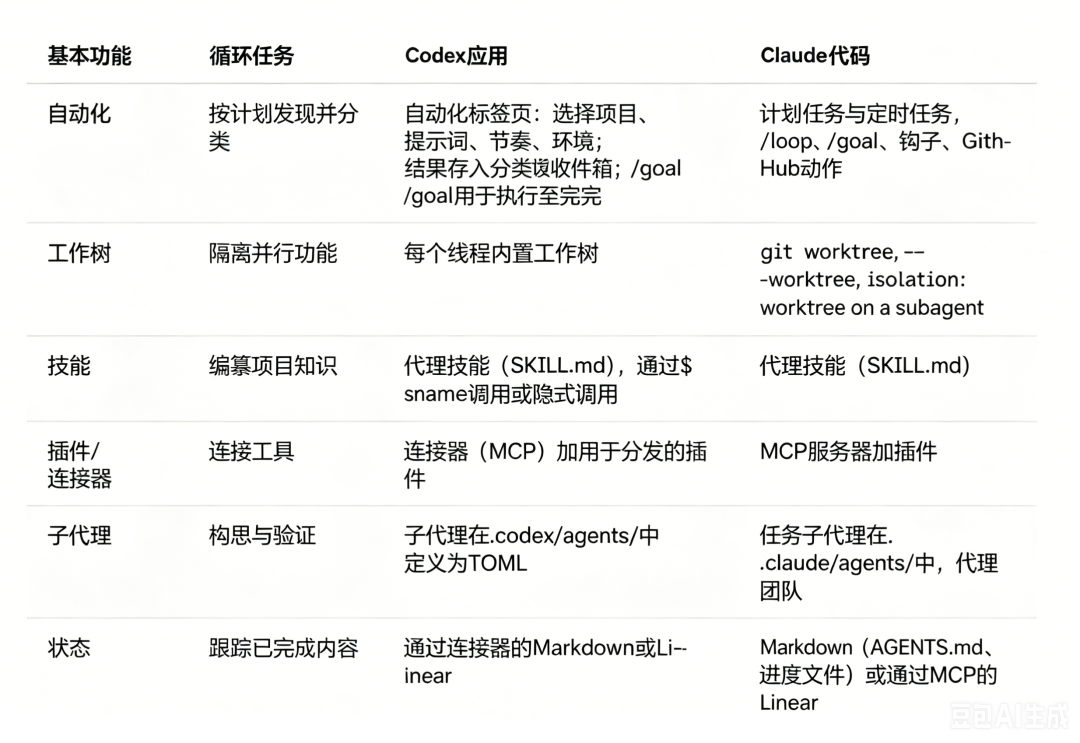
A typical loop looks like this:
Every morning an automatic classification task runs → it finds something worth fixing → it opens an isolated worktree → one agent is dispatched to write the code → another agent reviews it → it opens a PR and updates the ticket → whatever it can't handle lands in your inbox.
You only design this flow once. After that it spins on its own.
Three things to watch out for:
- Verification is still your job. The loop runs on its own and makes mistakes on its own. Don't believe it when it says "done" — you have to actually look.
- Comprehension debt. The faster the loop produces code, the more code you've never read. The accumulated "I don't understand this" has to be paid back sooner or later.
- Cognitive surrender. The most comfortable posture is often the most dangerous. The loop running things for you doesn't mean you can give up your own judgment.
One last line:
Go build loops, but don't forget you're an engineer. Where you put your effort has changed; the work hasn't gotten smaller. Build systems that push the agent forward, don't get pushed along by it — and remember: writing prompts directly still works great, it's all about balance.
The worktrees mentioned in the article have been covered here before. You can refer to the piece below:
Git Worktree: The Secret Weapon for Parallel Development with AI Coding Agents
Other related posts:
Weekly Notes 15 | AI Agent Development: Time Is the Biggest Cost