Dify MCP in Practice: Small-Parameter Models All Fall Flat
MCP development is booming, so I used Dify to test its minimum hardware and software requirements. From local models to third-party platforms, I tried DeepSeek, Qwen, and Llama to see how much it would cost in the end.

What I Tested
Tools: Dify + Ollama
Task: weather MCP Server calls using simple map services
- Amap
- Baidu Maps
(Tencent Maps was dropped from the test because it couldn't return content.)
Models:
- deepseek-r1:8B (local)
- qwen3:8B (local)
- qwen3:14B (SiliconFlow)
- qwen3:32B (SiliconFlow)
- qwen2.5:14B (SiliconFlow)
- qwen2.5:32B (SiliconFlow)
- llama3:8B (local)
- deepseek-chat (official DeepSeek)
Test Results
Amap
Amap's requirements are fairly simple: just wrap the city name in the city field.
{"map_weather": { "city": "深圳" }}
The response is also fairly simple:
{
    "map_weather":
    {
        "city": "深圳",
        "forecasts": [
        {
            date: '2025-7-24',
            ... // 这里是具体的数据
        },
        ... // 其他日期的数据
        ]
    }
}
Models Under 10B
On July 20, my first attempt with local models under 10B ended in total failure.
- deepseek-r1:8B — sending failed. It couldn't complete the test.
- Qwen3:8B — sending failed; its reasoning was long-winded, and multiple corrections didn't help.
- llama3.1:8B — sending worked, but reading failed.
A few days later, on July 24, I tried again and all the models sent successfully. It seems Amap added compatibility so that passing the city name directly also works—easier to use, though of course it also makes it easier for the models to bluff their way through:
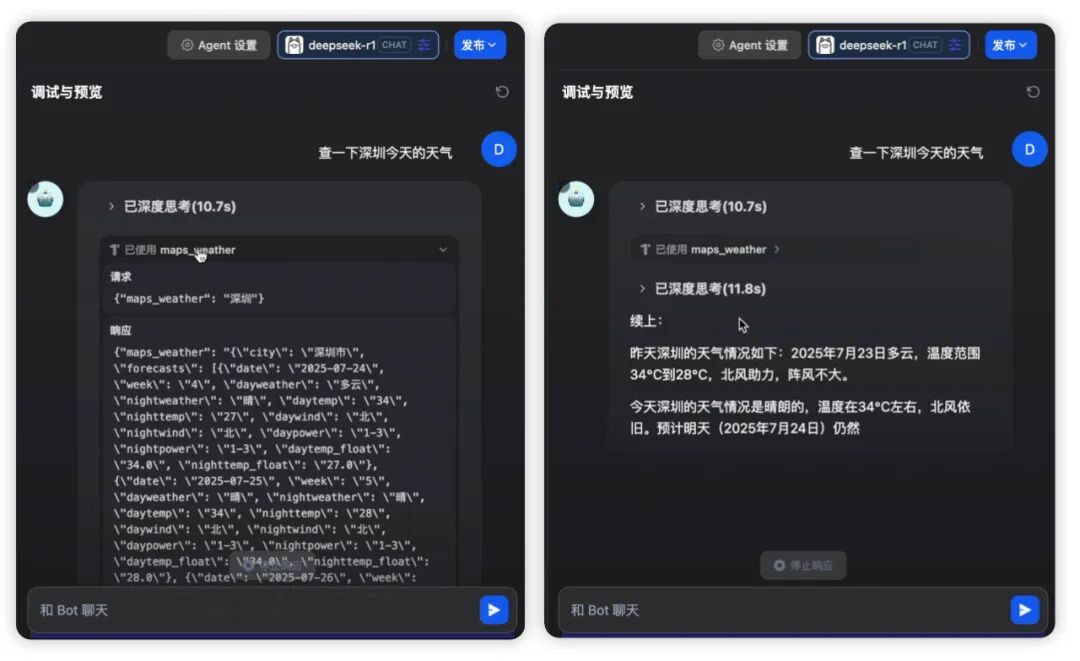
{"map_weather": "深圳"}
- deepseek-r1:8B — the displayed result was completely inconsistent with what MCP returned.
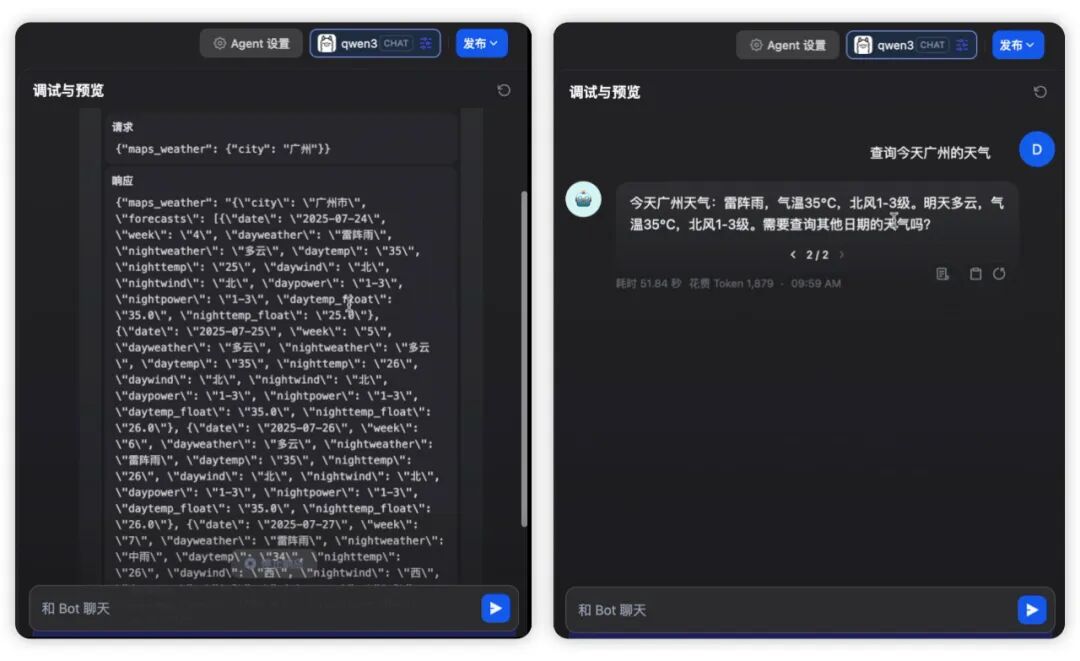
- Qwen3:8B — in the end it displayed correctly, but one run was suddenly interrupted.
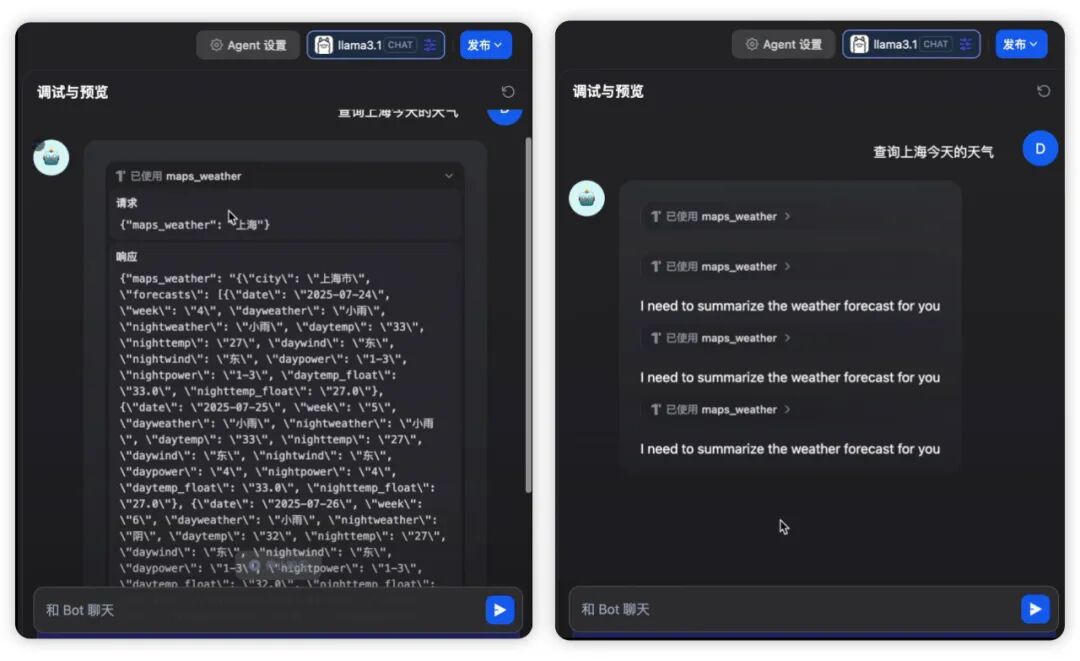
- llama3:8B — still couldn't parse the returned content.
With local deepseek-r1, both the request format and the returned information were wrong—even the basic dates for yesterday, today, and tomorrow were incorrect.
For Qwen3, the query format and response: the first query failed and was interrupted; after the second attempt it worked, but the result covered only today and tomorrow, and for today it only included daytime weather even though it was already evening.
llama transmitted correctly, but the result couldn't be parsed.
14B Models
For the 14B models, I used SiliconFlow's API. Because the platform lacked llama3.1, I didn't test it further.
Overall performance was a bit better, but there were still plenty of problems.
- deepseek still sent the simplest parameter form,
{"map_weather": "深圳"}, so it could still be bluffing its way through. The answer didn't distinguish between daytime and nighttime weather, and the moderate rain at night wasn't shown. - Qwen3 answered correctly and even added thunderstorm precautions. Its performance was already quite good.
Models Above 30B
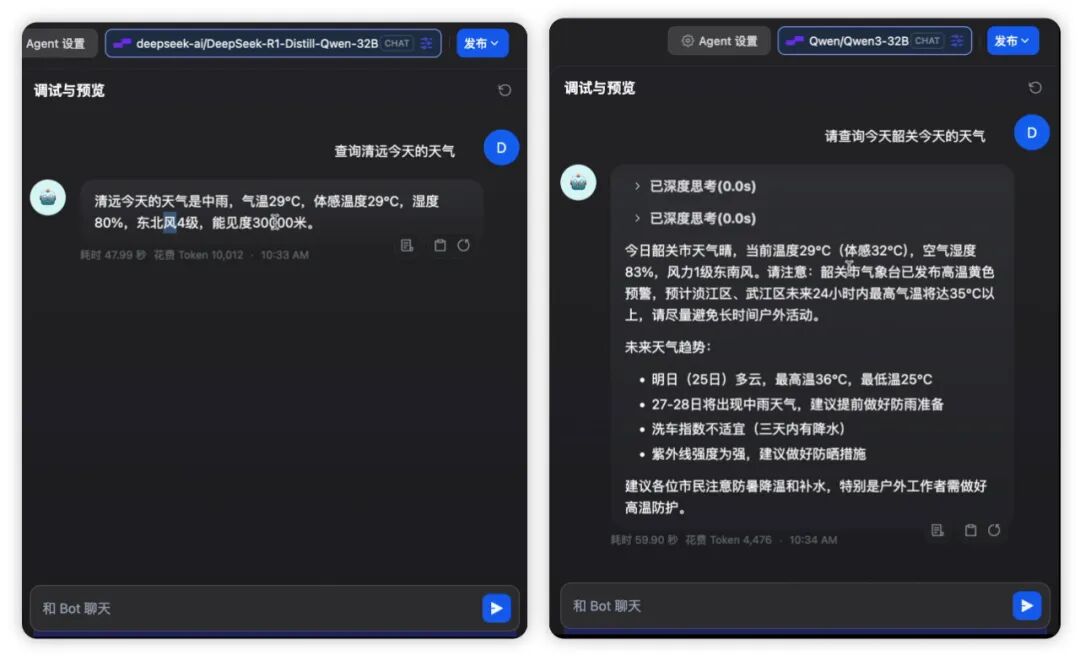
- deepseek:32B sent the correct parameters, but its response matched the 14B model's—the nighttime weather wasn't shown. It was also inconsistent, suddenly switching to English midway through.
- Qwen3-30B-A3B and Qwen-32B performed similarly and began using emoji. The formatting was more pleasant.
- The full-strength deepseek and Qwen3, of course, had no trouble at all.
Baidu Maps
Baidu Maps gives you two parameter options. One is the district code:
{"map_weather": { "district_id": "440200" }}
The other is latitude and longitude:
{"map_weather": { "location": "113.3667,22.5667" }}
The returned data structure is more complex:
{
    "map_weather":
    {
        "status": "0",
        "result":
        {
            "location": {}, //地点
            "now": // 实时天气预报
            {
                "temp": '27',
                "uptime": "20250724221500", //更新时间
                ... // 这里是具体的数据
            },
            "indexes": [], // 各种指数
            "alerts": [], // 警报
            "forecasts": [], // 一周天气
            "forecast_hours": [] // 小时天气
        }
    }
}
Models Under 10B
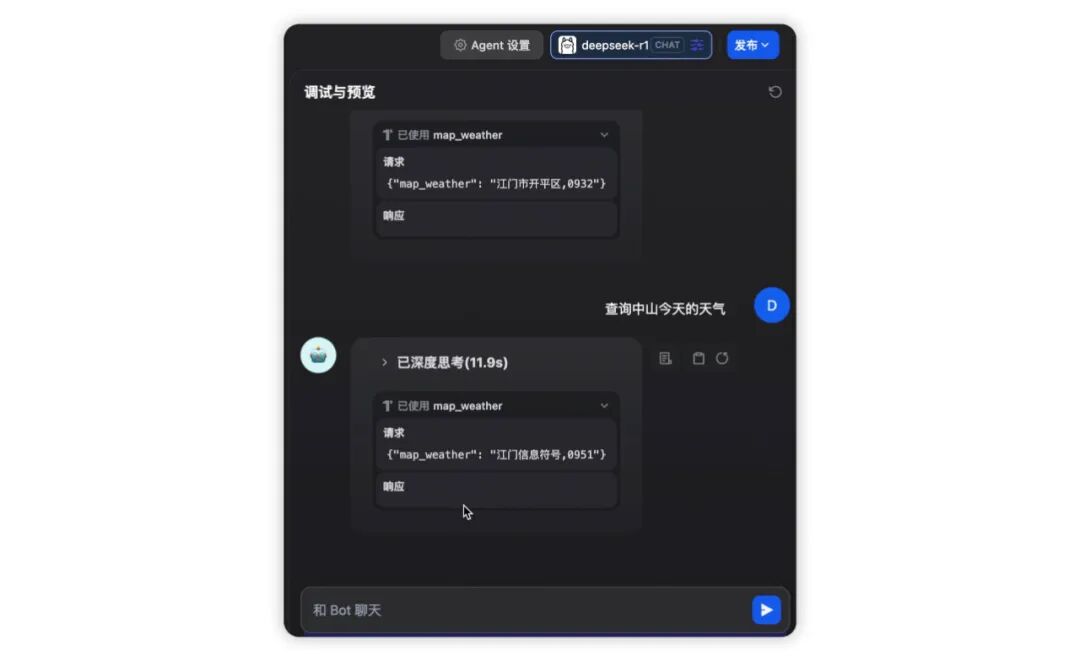
- deepseek-r1:8B — sending failed. It couldn't complete the test and interpreted
district_idas the district's ID. - Qwen3:8B — sending failed; its reasoning was long-winded, and repeated corrections didn't help.
- llama3.1:8B — sending worked, reading failed.
Local deepseek-r1 couldn't complete the task.
After two adjustments, local qwen3 got a normal response.
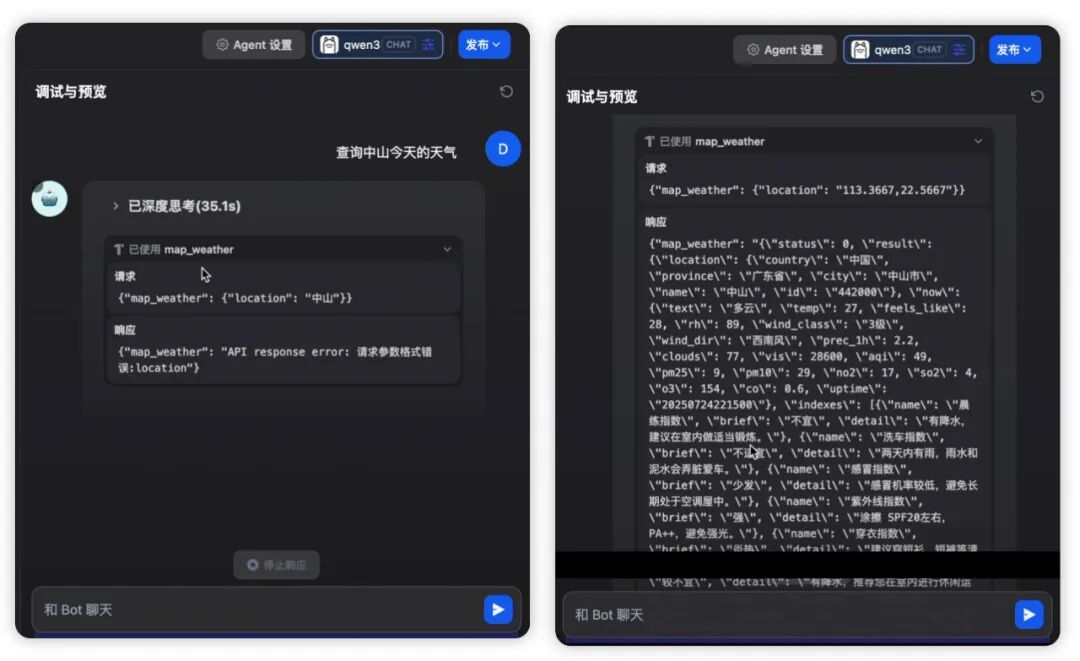
But it couldn't parse the result, babbled gibberish, and was finished.
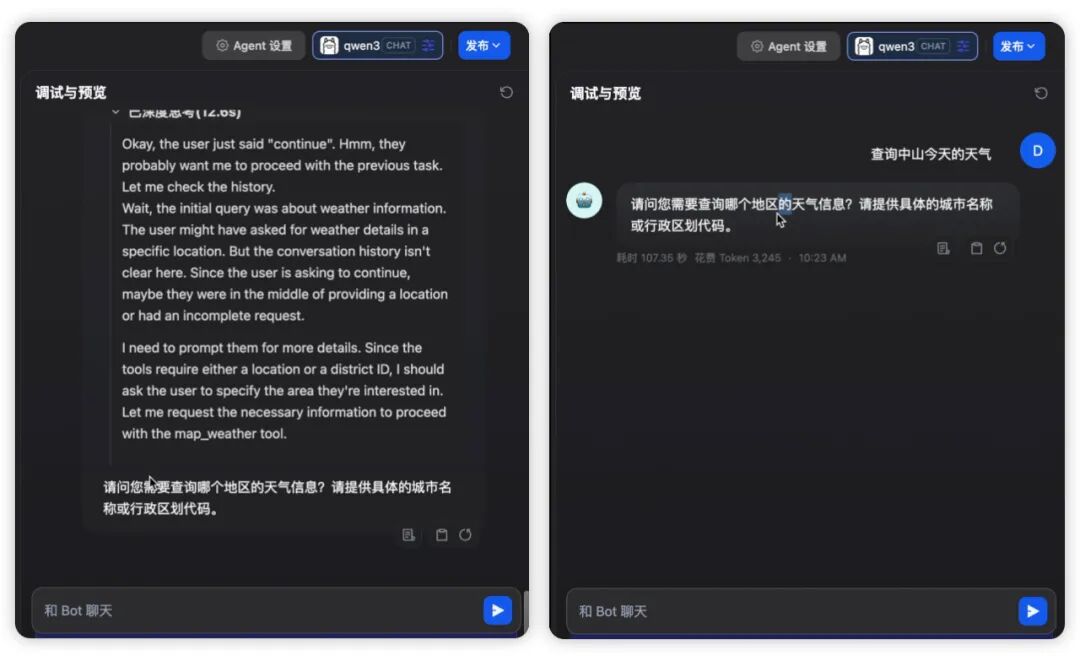
llama3.1, just like with the Amap response, got stuck in an infinite loop during parsing and also failed to complete the task.
14B Models
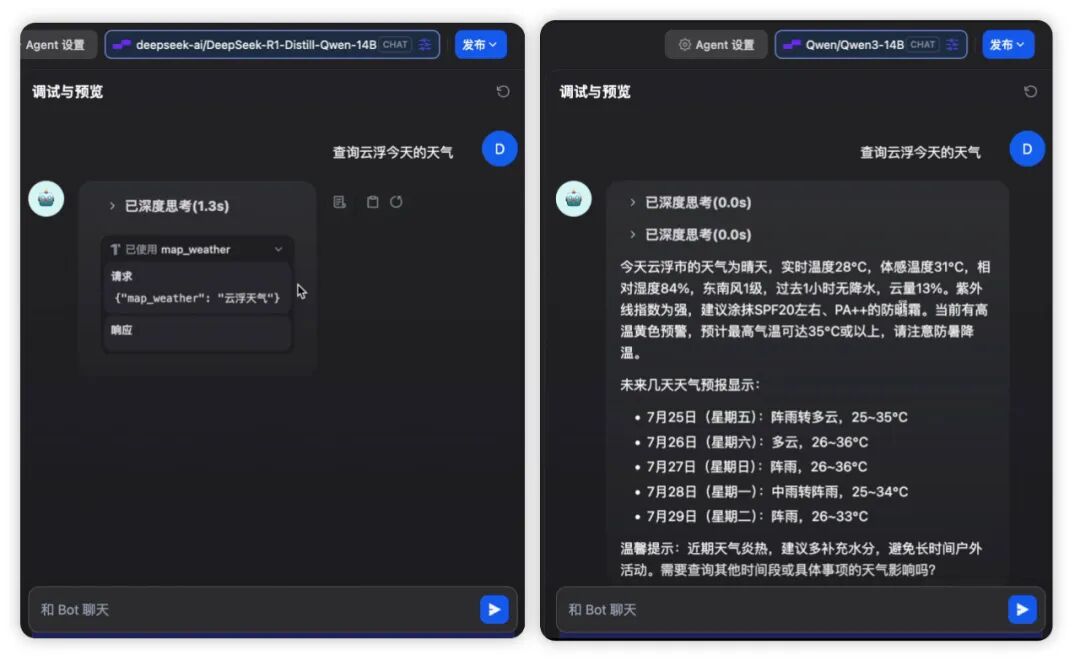
- deepseek-r1 — input error, failed
- Qwen3:14B performed well, parsed the indexes too, and even included a friendly reminder.
Models Above 30B
- deepseek:32B thought through it twice and got the input right, but its answer was too simple—it only parsed the now section.
- Qwen-32B performed well and parsed the high-temperature alert too.
- The full-strength deepseek and Qwen3 performed excellently, just as they did with the Amap MCP.
The Model Version Question
From the tests above, I'd conclude that MCP mainly tests a model's ability to handle JSON. There have been reports that OpenAI also needed one or two generations to solve the stability of JSON input and output.
So to test whether there was a generational issue, I chose Qwen for a second round of testing.
The results were exactly as expected: Qwen3 was clearly better than Qwen2.5.
- Qwen3's 14B already performed well.
- Qwen2.5's 32B still struggled a little to interpret the returned content.
It looks like the non-full-strength deepseek is indeed distilled from Qwen2.5; the two perform almost identically.
Summary
- A model's MCP handling ability rests on its JSON handling ability.
- A model's JSON handling ability is related to parameter count, but is even more strongly correlated with model size.
- The latest small-parameter models can handle MCP input well, but when MCP returns a large amount of data, only large-parameter models can handle it.
- Whether small-parameter models can achieve better interpretation later on is an open question—perhaps they can be optimized, or perhaps this is already the current limit.
If you want to practice MCP locally, you should choose a model at least on the scale of Qwen3-14B, so a Windows machine with 32 GB of RAM or a Mac with 16 GB is barely usable.
If efficiency is the priority, a third-party provider may be the better choice.
Pricing
Using a third party inevitably brings pricing into play.
Below is a price comparison from one platform.
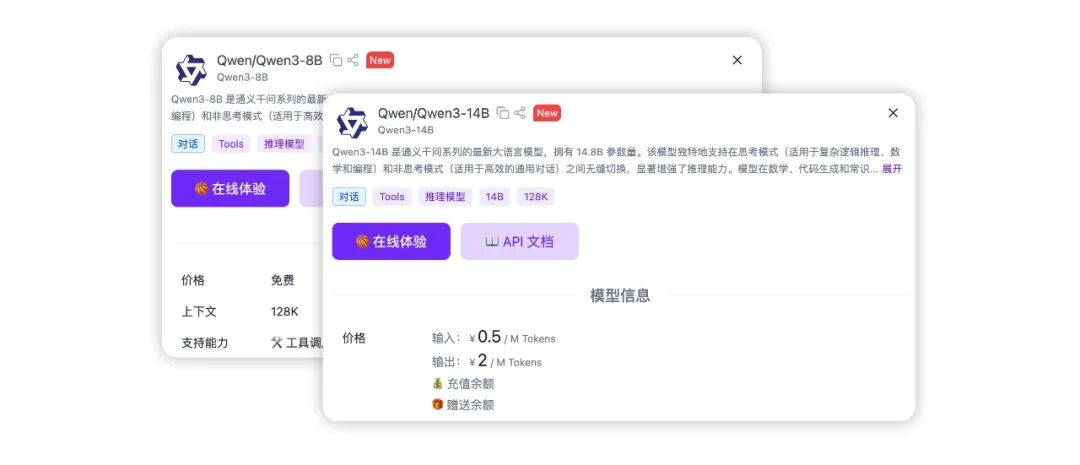
As you can see, 8B models are free on third-party platforms because what they can do is really very limited. Charges start at 14B, and it isn't cheap. Even at per-million-token rates, a serious project will spend quite a bit after several rounds of testing.
So it looks like MCP development inevitably comes with costs.
This test cost just 0.47 yuan.
I hope this half-yuan can be of some help to everyone.
If you think this half-yuan was worth it, give the article a like.