Why Do We Need Coding Standards?
"Why do we need coding standards?" It's already common knowledge among people in the industry, but for those who haven't entered the field or have only just started out, it really is a question worth clearing up.

"Why do we need coding standards?"
People already in the industry might answer, "Is that even a question? Does it need discussing?" — because by now it's common knowledge among practitioners. And yet for those who haven't entered the field or have just started out, it genuinely is a question. What's more, once it's cleared up it helps them build better instincts, so the work ahead goes more smoothly.
The great Donald Knuth said in The Art of Computer Programming that code is written for people to read, and only incidentally for machines to execute.
"Programs are meant to be ready by humans and only icidentally for computers to execute."
Donald Ervin Knuth, The Art of Computer Programming
How should we understand that?
At first glance it runs against our intuition, but on reflection it makes perfect sense. In the machine's world, code all ends up as zeros and ones, and the machine couldn't care less what it looked like to begin with; in the human world, on the other hand, code has to be read and reread — const a = 0 and const showDialog = false are simply not the same statement to a person.
So code really is written for people to read.
And since code is written for people to read, we should find a way to write good-looking code. Good-looking in what sense? Here I split it into two kinds: pleasing to the eye and pleasing to the mind.
## Goal one: pleasing to the eye, it looks comfortable
Pleasing to the eye means literally looking good — punctuation, formatting and layout all have to be handled well.
It doesn't need to be laid out as meticulously as an official government document, down to every character, word and punctuation mark, nor do you need to agonize over every keystroke like someone with OCD. But at the very least, indentation levels should line up and spacing should be consistent.
And luckily, today's coding tools handle most formatting problems for you. You just right-click and reformat. Below is an xlsx parsing tool I restored; overall it's still reasonably readable:
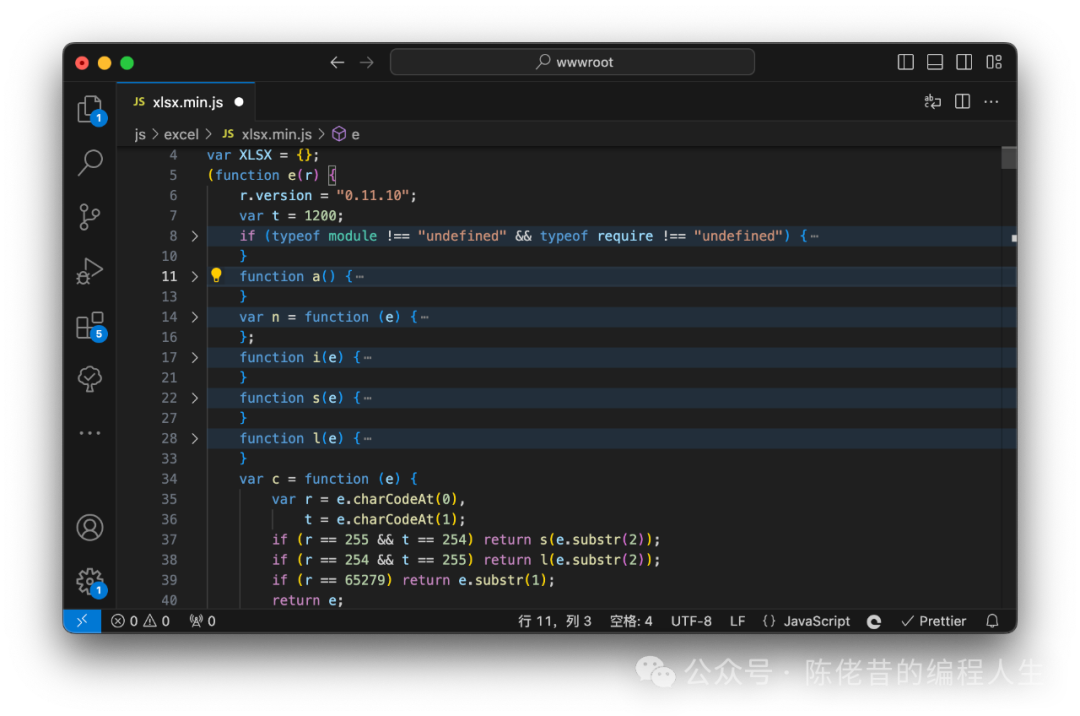
Beyond the code itself looking good, you can extend the standards to folder structure and project architecture. For example, here's a project written in AngularJS.
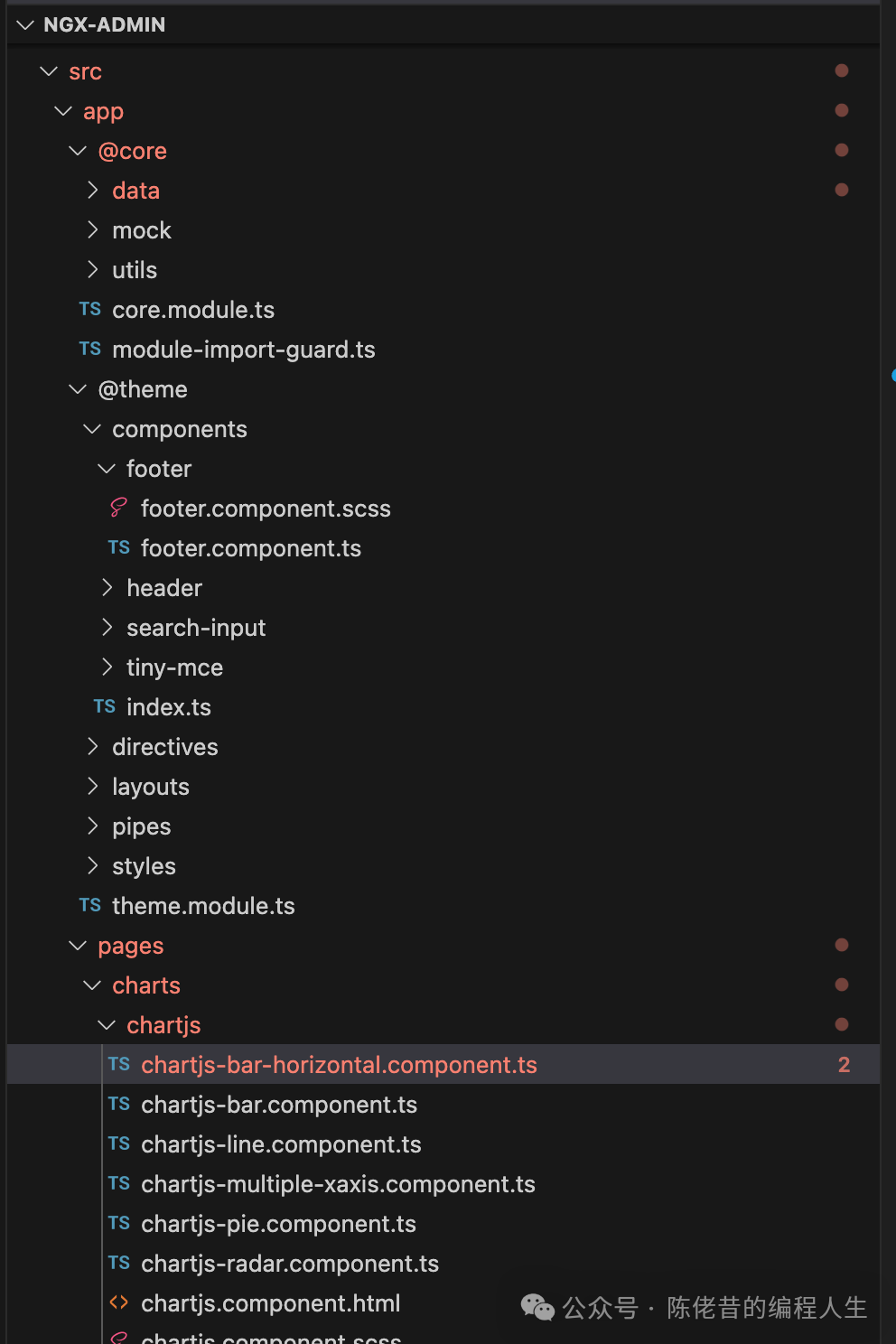
Inside the folders, the function of each folder is spelled out in exhaustive detail:
@corecontainsdatafor data handling,mockfor local data simulation, andutilsfor the common JS utility library;@themeis divided into components, directives, layouts, pipes and styles;pagesholds the components, html and css for each page
File naming is equally deliberate:
- a module suffix marks module code, as in core.module.ts
- a component suffix marks component code, as in chartjs-bar.component.ts
- a layout suffix marks layout code, as in one-column.layout.ts
- files for related functionality keep a consistent naming prefix, such as chartjs-bar-horizontal.component.ts and chartjs-bar.component.ts
Reading through a directory structure like this gives you a good grasp of the project as a whole. If I asked you to change a piece of data now, you'd immediately know to go look at the code in @core/data.
Lay folders, files and code out neatly, and let the maintainers who come after you organize and develop by the original rules — that achieves the goal of pleasing the eye.
## Goal two: pleasing to the mind, lowering the cognitive load
Pleasing to the mind is about cutting mental effort — what people these days call lowering the cognitive load.
### 1. Fewer bugs
Imagine picking up an old project: you run it, the console spits out a pile of warnings, and you break into a cold sweat. Then, at 99%, a few errors appear and the whole project simply won't start — at that point you're a wreck.
So our standards must first guarantee that the project runs, and steer clear of the things that easily produce bugs.
For instance, patterns that invite XSS attacks, Java's null pointers, and turning strings into functions with eval on the front end — all of these are covered in the standard, which points out how to handle them.
Another example is the Vue rule that component names must have multiple words. The official explanation: this avoids conflicts with existing and future HTML elements, because all HTML element names are single words. It considers not just the present but also what might appear in the future.
### 2. Easier to understand
How to make code easier to understand takes up a large share of any coding standard.
Take the ever-present naming question. You can specify common verbs — get, set, save, load, delete — as the standard prefixes for method names. You can also avoid mixing pinyin and English, because that forces a reader to switch back and forth between two languages, which is really painful. And for industry software, providing a glossary of the industry's English terms is friendlier for us Chinese developers.
Take comments, too: the function's purpose, its inputs and outputs, and even examples should be written out clearly. Here's the comment on the deep-copy method in the front-end utility library lodash — 3 lines of code, with a full 10 lines of comments:
**
 * This method is like `clone` except that it recursively clones `value`.
 * Object inheritance is preserved.
 *
 * @since 1.0.0
 * @category Lang
 * @param {*} value The value to recursively clone.
 * @returns {*} Returns the deep cloned value.
 * @see clone
 * @example
 *
 * const objects = [{ 'a': 1 }, { 'b': 2 }]
 *
 * const deep = cloneDeep(objects)
 * console.log(deep[0] === objects[0])
 * // => false
 */
function cloneDeep(value) {
    return baseClone(value, CLONE_DEEP_FLAG | CLONE_SYMBOLS_FLAG);
}
There's another thing to watch: functions have an order and a hierarchy.
Breaking functions into small, sharp functions, or organizing and layering functions in a regular way, with no arbitrary jumping around, all let people grasp the code quickly. Modern languages no longer have a goto statement like the old Basic, but people still write long if-else chains inside a function and call other functions at random, and that likewise makes for hard reading.
These points can go into our standards as well.
For example, an ideal piece of front-end vue code:
<script>
import '...' from vue;
import '...' from '@utils/'; // 将常用的函数方法放在外面的工具库中
import '...' from './components/';

export default {
  components: {},
  props(){},
  data(){},
  methods: {
    // 其他一些被本组件调用的函数
    ...,
    // 最后的入口函数
    getData(),
    processData(),
    bindEvent(),
  },
  mounted() {
    this.getData();
    this.processData();
    this.bindEvent();
  }
}
</script>
<template>
...
</template>
<style>
...
</style>
You can see it follows a certain order:
- Define before use: the
scriptthat defines variables comes first, thetemplateafter it; - imports bring libraries in from far to near.
- When defining a component, the externally provided
componentandpropscome first, then the localdata, and finally themethodsand themountedentry point; - Among methods, the lower-level a method is, the higher it sits; the methods that the entry point calls come last.
Handled this way, if you want to read the code as a whole, you only need to start at the entry and read down to get the general picture; when you need the details, you just read upward.
### Summary
Writing code that is pleasing to the eye and to the mind is a goal that is neither big nor small, and it's something we should think about from the very first day we write code.
And the coding standard needs to point the way for us — that, I think, is the meaning of its existence.