Plan Mode in China's AI Coding IDEs: How They Differ from Cursor
To handle more complex development scenarios, quite a few AI coding IDEs have now rolled out a Plan mode. The hope is that this mode can automatically break down tasks, plan the development steps, and generate a code framework, easing the burden on developers.
Apart from Alibaba's Qoder Quest, which is paid, the free versions of Tencent's CodeBuddy, ByteDance's Trae, and Baidu's Comate all have this feature. Cursor shipped it back in its 2.0 release in October and is relatively mature. This article compares the Plan modes of these tools against Cursor.
For this round of testing, I used the following prompt to evaluate each tool's planning ability:
开发一个完整的HR管理后台系统,包含员工信息管理、考勤记录、薪资计算、绩效评估和招聘管理模块。
系统需要实现用户权限分级(管理员、HR专员、普通员工)、数据可视化报表生成、以及Excel导入导出功能。
界面设计要简洁现代,确保响应式布局适配不同设备。
提供完整的API文档和单元测试覆盖。
Test Results at a Glance
Let me give you the conclusion first: none of the tools' Plan modes could automatically complete the entire project; all of them required a lot of follow-up manual debugging and fixes.
- Trae: you have to enter the SOLO interface to start Plan mode, and it develops and debugs as it goes thanks to its debugging ability, so it had the highest degree of completion. Even so, the system it finally produced still needed bug fixes page by page.
- Comate: a clear improvement over the test three months ago; it could generate a frontend interface, but none of the features actually worked, and the problems likewise had to be fixed one by one.
- CodeBuddy: the generated code threw a huge number of TypeScript errors, and the fixing process was like whack-a-mole — kill one and a few more pop up. In the end I had to give up.
- Cursor: because it required configuring a database (no sample was provided), it created a barrier for users unfamiliar with the backend, and the attempt was eventually forced to stop.
In terms of time spent: Trae SOLO took the longest (3+ hours), CodeBuddy averaged just over an hour, Comate less than an hour, and Cursor "finished" planning in only 15 minutes (but the result wouldn't run).
Plan Documents and Task Execution
On the generated plan document, CodeBuddy did the best job.
Its new version released on December 21, 2025 offers very rich planning content, covering the frontend interface, backend data, design color scheme, and overall architecture.
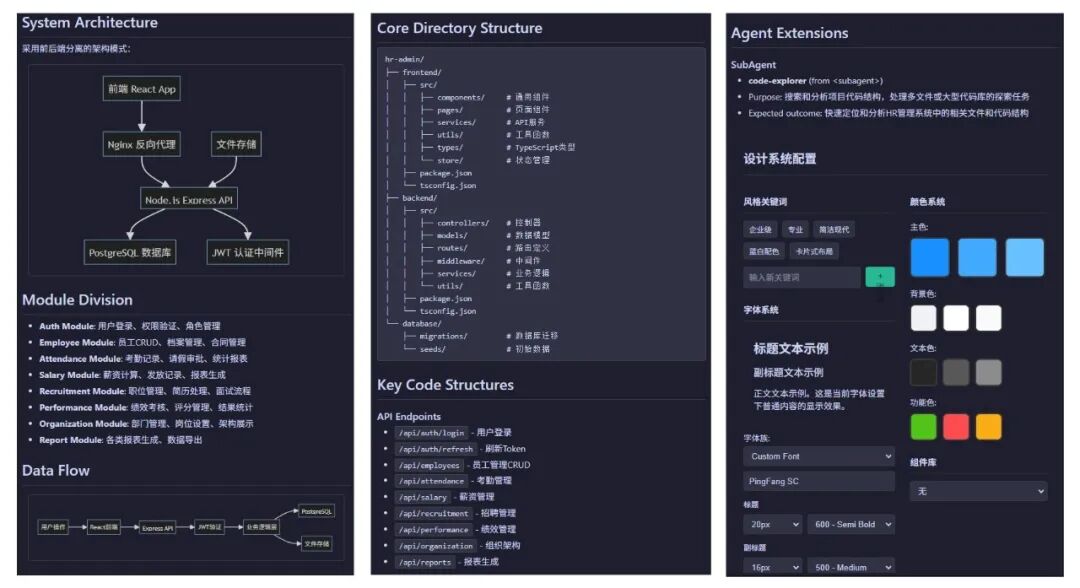
Next came Cursor and Trae; their plans included the data design, but compared with CodeBuddy they lacked details such as UI color design and flowcharts. Comate's plan was relatively simple, mainly listing the project file structure and the development steps.
Trae also fixed descriptions in earlier versions that clearly didn't match the pace of AI development, such as "the development cycle will take 1-2 weeks."
Turning a plan into executable tasks is another matter. Apart from Cursor, which could generate tasks strictly according to the plan, the other tools more or less adjusted the tasks. Cursor was stronger on consistency between plan and tasks.
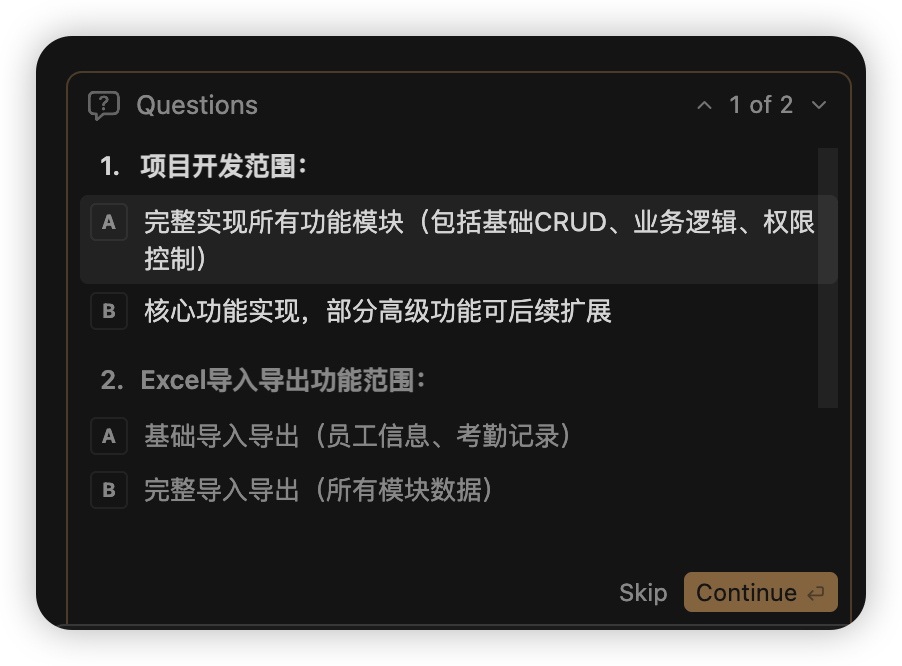
Cursor also had an obvious edge in interaction details. Before a task starts, it has a "requirement clarification" and "technical solution selection" step, which users can confirm with the mouse or keyboard. Other IDEs usually require users to type instructions manually.
CodeBuddy had some bright spots too: its new version lets users customize the order in which tasks are executed, which is more flexible than the old version, and it's easier to resume after a task is interrupted.
Overall: Cursor comes out ahead on interaction details, document delivery, and consistency between plan and task execution; CodeBuddy has highlights in interaction and documentation; Trae and Comate lean more toward the traditional "programmer's tool" and still need work on the details.
Bonus: Scoring the Backend Code
Since none of them ended up producing a runnable system, let's take a look at the quality of the backend code each tool generated.
As a frontend developer, I used Cursor's AI to score this code against the following criteria:
- Architecture design (20 points): modular design, layered architecture, dependency injection, extensibility — 5 points each
- Code quality (20 points): coding conventions, type safety, code reuse, code comments — 5 points each
- Security (20 points): authentication, permission control, data validation, security configuration — 5 points each
- Database design (15 points): entity design, migration management, query optimization — 5 points each
- Error handling (10 points): exception handling and error messages — 5 points each
- Test coverage (10 points): unit tests and integration tests — 5 points each
- Documentation and tooling (5 points): API documentation 3 points, development tooling 2 points
The backend code scores for each tool are as follows:
| Scoring item | Codebuddy | Comate | Trae | Cursor |
|---|---|---|---|---|
| Architecture design 20 | 17 | 10 | 10 | 17 |
| Code quality 20 | 16 | 10 | 13 | 15 |
| Security 20 | 16 | 12 | 12 | 16 |
| Database design 15 | 12 | 8 | 11 | 12 |
| Error handling 10 | 6 | 4 | 4 | 6 |
| Test coverage 10 | 0 | 0 | 3 | 2 |
| Documentation and tooling 5 | 4 | 1 | 4 | 4 |
| Total 100 | 71 | 45 | 57 | 72 |
Codebuddy's code was generated based on GLM 4.6; the other IDEs used Auto, which is most likely their own in-house models.
The final evaluation report was reasonably objective. The main problems with each IDE's generated code are summarized below:
CodeBuddy performed well on architecture and code quality, but had problems with missing tests, insufficient security configuration, and incomplete documentation — specifically the lack of unit and integration tests, global exception handling, database indexes, security configuration such as request rate limiting, and comments on key business code.
Comate's problems were broader, touching architecture, security, testing, and the toolchain. Its code lacked data input validation; it had no Service layer, which left the Controller bloated; it didn't use TypeScript, so type safety couldn't be guaranteed; and it lacked dependency injection, database migration management, a global error-handling mechanism, database indexes, unit and integration tests, and Swagger API documentation.
Trae's problems were concentrated in architecture layering, security practices, and type safety. The code lacked a Service layer and a data validation library, and it also lacked global error-handling middleware and a dependency injection framework. On the security side, the JWT secret used a default value, and the CORS configuration needs improvement. In addition, it used the any type in TypeScript and lacked database migration management.
Cursor's code was fairly complete in overall architecture, but there is still room to improve on detail refinement and engineering practice. Specific problems include: no unit or integration tests; no global exception filter or unified error response format; the JWT secret used a default value; TypeScript strict mode wasn't enabled, and there were quite a few any types; and it lacked database indexes and comments on complex business logic.
One thing to note: this scoring is based only on static code analysis and is for reference only. For example, CodeBuddy scored high, but in actual runs it threw a huge number of TypeScript errors, and the cost of fixing them was very high. At the same time, large models iterate quickly; the conclusions in this article are based on testing at the end of December 2025 and may change in the future.
Benchmarking is hard work, and it eats up a lot of time~
If you think it's worth reading, please like, share, and drop a coin~
Thank you!