A Look at an Open-Source Design Tool Built for AI Agents
I'd had enough of bloated cloud design software, and enough of AI-generated images where changing one thing means starting over from scratch. Recently I dug up a young but sharp open-source project on GitHub called Calqo: local-first, every AI-generated layer stays editable, and it even lets an Agent get hands-on and draw for you.
As someone who occasionally needs to make graphics, I find today's design tools always come with some annoying drawback.
Either the software is as bloated as Photoshop; or the design is locked in the cloud like Figma; or you generate images with AI, as with CodeX, where changing two words burns a huge amount of time and tokens.
The core of all three pain points is really one problem: I generated the design, but I don't own it; AI drew the image, but I can't edit it.
Recently I came across a new project on GitHub that solves all three. It's called Calqo.
Repo: https://github.com/kilianvivien/calqo

Its one-line positioning:
Make polished social graphics. Keep every layer editable.
(Produce polished social visuals, and keep every layer editable.)
Officially it's pitched as "the most focused 20% of Canva, without the weight of a cloud suite"—open source (MIT), local-first. The official positioning is a social media visual tool, but after using it I found its capability boundary is actually much wider than you'd expect.
Calqo's most "2026" feature is that the desktop app ships with a local MCP server (off by default, bound to 127.0.0.1, with a pairing token, and write operations requiring in-app approval).
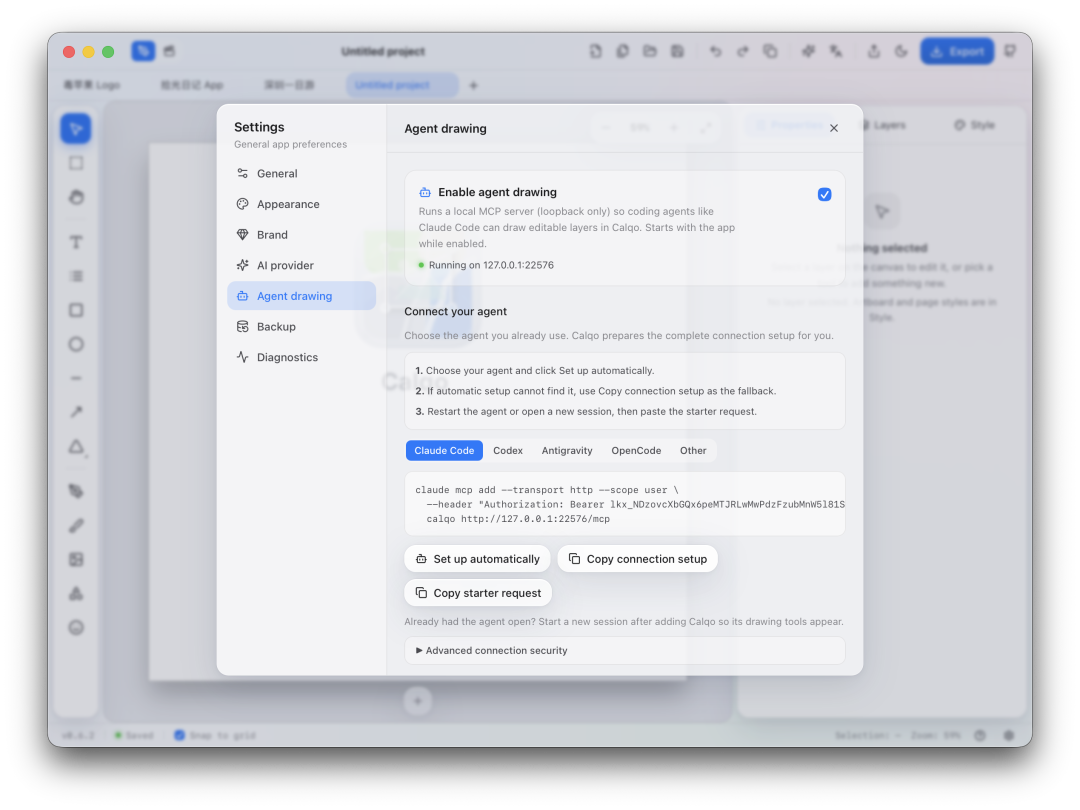
Once enabled, Agents like Codex, Claude Code, and OpenCode can operate directly on the design file you currently have open.
I tested two integration setups myself:
- Cursor + Grok/GPT
- OpenCode + DeepSeek model
The overall experience was very smooth. The Agent can view the current project, artboards, layers, and palette, and can add, delete, and modify layers, group them, and generate multilingual variants; changes are applied as a single undo step, and a fresh preview is available the moment it's done. The only thing to watch out for: after configuring MCP, you need to restart the app.
Whether it's actually good, you have to try hands-on to know.
I did three things with Calqo, covering three completely different scenarios:
1. Designing a "poison apple" logo
I tried to design a logo with it on the theme of a "poison apple"—an apple symbol that looks both dangerous and alluring.
The end result: it used SVG to generate something you recognize at a glance as a poison apple. A production-grade logo would probably still need a senior designer to refine it, but as a concept draft, the whole process had zero friction. From zero to presentable took only a few minutes.
2. Designing a "Xiaohongshu-style" Shenzhen one-day trip graphic
This scenario is the real "giving the AI a brief." I just told the AI "make me a Xiaohongshu-style Shenzhen one-day trip post," and the domestic model immediately grasped the tone of Xiaohongshu visuals—high saturation, strong contrast, high information density without mess, and big, eye-catching titles.
After Calqo generated the template, I could still adjust fonts, swap images, and change the order of the copy myself—it wasn't a frozen image. The AI understood the words "Xiaohongshu style," and Calqo's layers held it up.

3. Designing three screens for a journaling app
This step was to test Calqo's boundaries. I had it build the UI for a journaling app—login page, home page, and "My" page.
When it was done I was a little surprised: the level of completion was quite high. Sensible layout, comfortable spacing, clear component hierarchy, and an overall style that's consistent and doesn't look cheap.
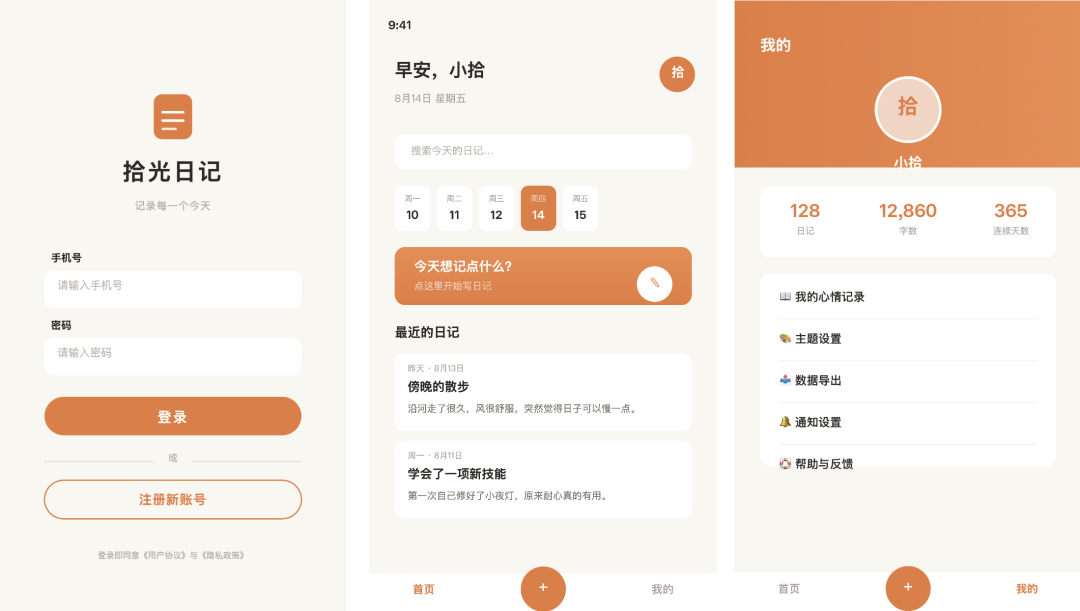
Although Calqo officially says its positioning is social media visuals, this experiment confirmed a judgment for me: its capability isn't locked in by the "self-media" label—using it for product prototypes or even simple UI mockups is entirely feasible.
Of course, this is a very young project—it currently has only 4 stars (one of them is mine).
But here's a signal I'd take as a vote of confidence: this project, created in June, shipped six versions over the two months from late July to late August (0.5.0 → 0.6.5), and its docs directory holds a security audit, an export-fidelity note, and a list of known MCP limitations. Small and sharp, iterating fast—that's rare among individual open-source projects.
Calqo strikes me as having grasped the three core tensions of visual tools:
- The weight of a cloud suite vs. the freedom of local files;
- The convenience of AI generation vs. the editability of layers;
- In the Agent era, "machines editing files" vs. people's final control.
Its answer is to make "editable" and "local" constitutional principles, then let AI and Agents work inside that boundary. It's still small, still Alpha, still macOS-only, but my hands-on experience tells me: this project is worth a star and worth keeping an eye on.
If you're suffering from the same things—bloat, the cloud, AI output you can't edit—give it a try. My guess is it will most likely save you some time.
You can download the latest DMG from the GitHub Releases page: