oMLX: A New Tool for Running Local LLMs on Your Mac
Running local LLMs on a Mac has always been limited by performance. Today I want to recommend oMLX, a tool built specifically for Mac and tuned for it, which delivers a different kind of experience.
Running local large language models on a Mac benefits from Apple Silicon's unified memory architecture: data doesn't have to be copied back and forth between VRAM and RAM, which strengthens AI inference. Even so, overall performance still falls short of dedicated AI workstations.
And tools like Ollama and LM Studio aren't optimized for Apple's architecture. As a result, the Mac's hardware potential (the Neural Engine, for instance) often goes untapped.
The open-source library I'm introducing today, oMLX, may give Mac users new hope and a better local AI experience.
What is oMLX?
Project address:
https://github.com/jundot/omlx
How to use it: download the DMG file from the project's Releases page.
https://github.com/jundot/omlx/releases
Simply put, oMLX is a local large language model service deeply optimized for Apple Silicon chips (the M series and later). It's built on Apple's official MLX framework, and it is not just a model loader but an efficient inference engine that makes full use of Apple's hardware features.
Comparison with Ollama and LM Studio
| Feature | oMLX | Ollama | LM Studio |
|---|---|---|---|
| SSD KV Cache | ✅ | ❌ | ❌ |
| Continuous batching | ✅ | ❌ | ❌ |
| Menu bar controls | ✅ | ❌ | ❌ |
| Anthropic API | ✅ | ✅ | ✅ |
| MCP support | ✅ | ❌ | ✅ |
Core strength: SSD KV Cache
oMLX's most important technical innovation is just one thing: persisting the KV Cache to SSD.
What does that mean?
When a large model holds a conversation, it stores its earlier "memories" (that is, the context) in the KV Cache. Conventional approaches (such as Ollama and LM Studio) keep the entire cache in memory.
Once the conversation context changes (say, you switch topics), the whole cache is invalidated and has to be recomputed, which pushes time to first token (TTFT) to as much as 30–90 seconds.
oMLX's approach is:
- Hot data in memory, cold data on SSD.
- Whenever the context needs to be restored, nothing has to be recomputed — it's read straight from the high-speed SSD.
- TTFT drops from 30–90 seconds to under 5 seconds.
For use cases like Coding Agents, which constantly need to go back through context, that's a huge improvement in experience.
Hands-on test: 16GB M1 Mac mini
I ran some tests on my bargain-basement 16GB M1 Mac mini:
Memory and swap comparison
Using the same prompt, I had the Deepseek-R1:8B model build a small game.
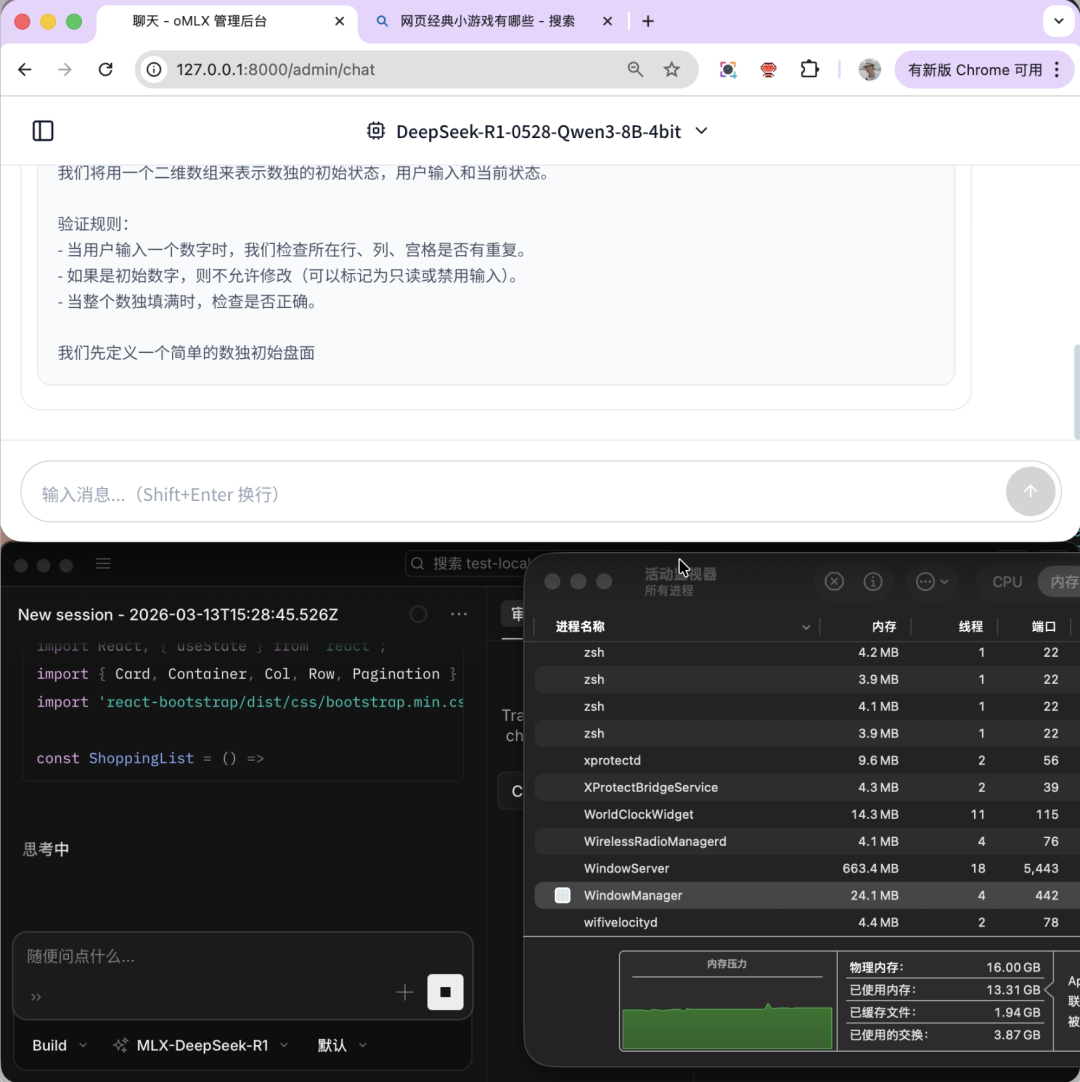
- Ollama: memory use stayed under constant high pressure, with resident memory often above 14GB and swap usage frequently over 7GB.

- oMLX: memory pressure was still high, but usage stayed relatively steady around 13.5GB, occasionally reaching 14GB. Swap usage dropped noticeably, to about 2.50GB–3.99GB.

The contrast is very obvious. On top of that, the occasional endless loop in Ollama that couldn't be stopped never happened in oMLX.
TTFT comparison
With the same prompt:
- Ollama's desktop app: TTFT of about 6–8 seconds.
- oMLX's web UI: TTFT of about 3–6 seconds, and you can clearly feel it's faster.
⚠️ Note: this advantage is most obvious with the optimized models provided by mlx-community. With other models the advantage is small.
Multi-turn conversation and coding tests
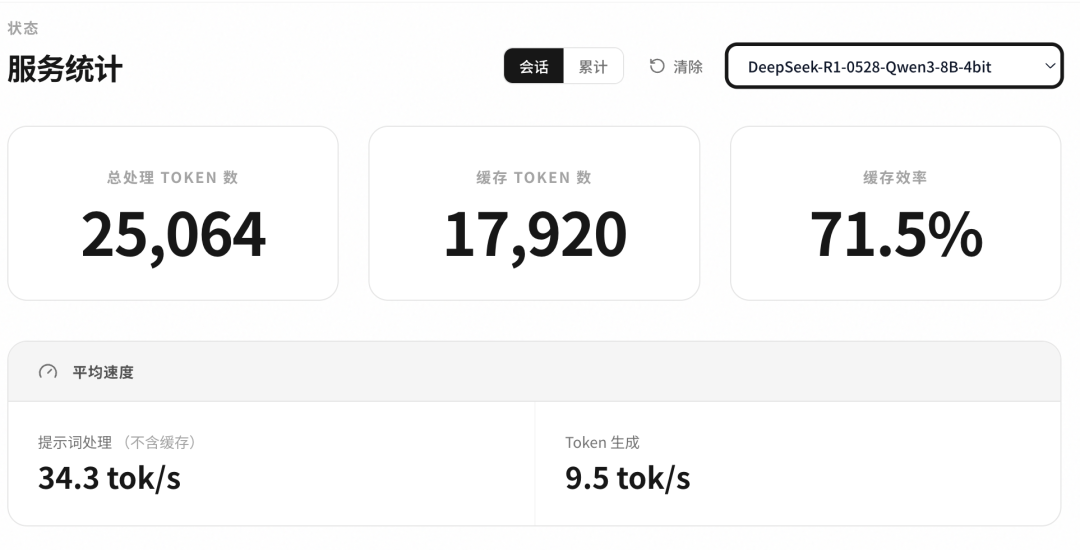
Over multiple turns, oMLX's chat experience was very smooth, and it even had a tendency to get faster the longer we talked, which rarely happens in Ollama. Checking the backend, the number of cached tokens had soared, with cache efficiency reaching 71.5% — though disk usage started to climb.
oMLX supports OpenAI- and Claude-compatible API interfaces, so you can expose its API to tools like OpenCode for writing code.
That said, the 8B version of Deepseek-R1-0528 released last year could only sustain 3 effective rounds of conversation.
After switching to the small Qwen 3.5 4B 4bit model released during the Spring Festival holiday, memory pressure dropped sharply, multi-turn conversations went through smoothly, and it could even call command-line tools without trouble.
But possibly because of the model's own limitations or an adaptation problem with OpenCode, it got interrupted frequently in OpenCode.
Multi-tasking test
Multi-tasking is another of oMLX's strengths.
Under Ollama I hardly dared try running several tasks at once, because it crashed so easily. But on oMLX, I tried using the web UI for Q&A while also calling its API from OpenCode.
When OpenCode started hitting the API, output in the web UI stalled. I assumed it would crash, but it didn't. After about 40 seconds, the web UI resumed output; 1 minute 20 seconds later, OpenCode also started outputting normally.
The tasks finished successfully in the end. Even then, total memory usage still hadn't exceeded 14GB, with swap growing to 3–4GB.
Connecting it to OpenClaw
To test whether oMLX can handle everyday chat, I hooked it up to the recently more popular OpenClaw.
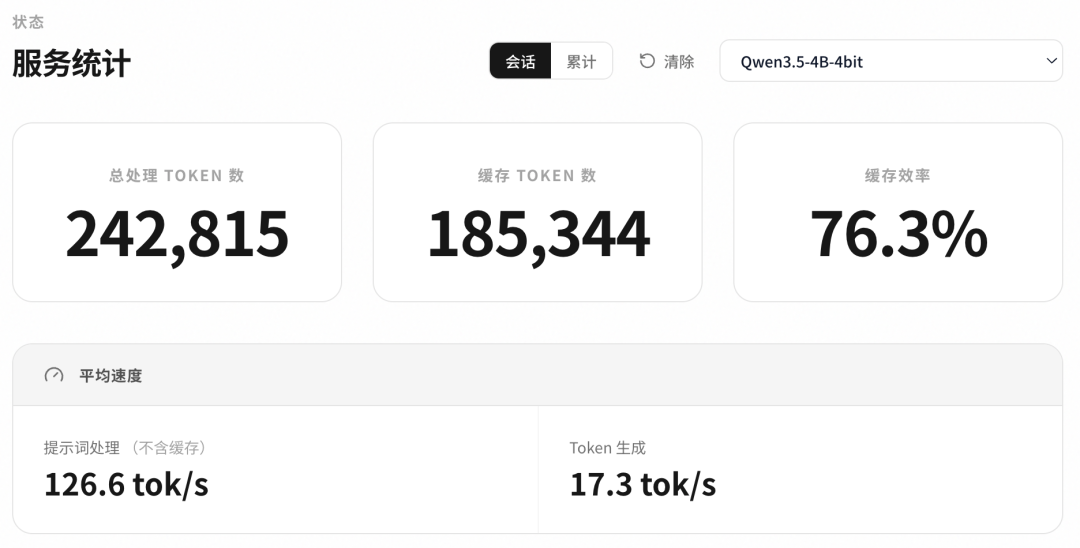
The model I used was the Qwen 3.5 4B 4bit version. In testing, oMLX supported OpenClaw's everyday chat needs well and stayed stable across multiple turns.
Without SSE enabled, Feishu could still return long chunks of conversation within 20 seconds.
One thing I felt clearly: OpenClaw consumes far more tokens than a simple API call or web chat. Even so, oMLX held up under the pressure, with no crashes or serious stutter caused by insufficient memory or performance — the overall experience was smooth.
Prompt processing even hit an impressive 126.6 tokens/s.
If your OpenClaw plan isn't enough and you need to save tokens, you can use this setup for everyday chat.
Benchmark
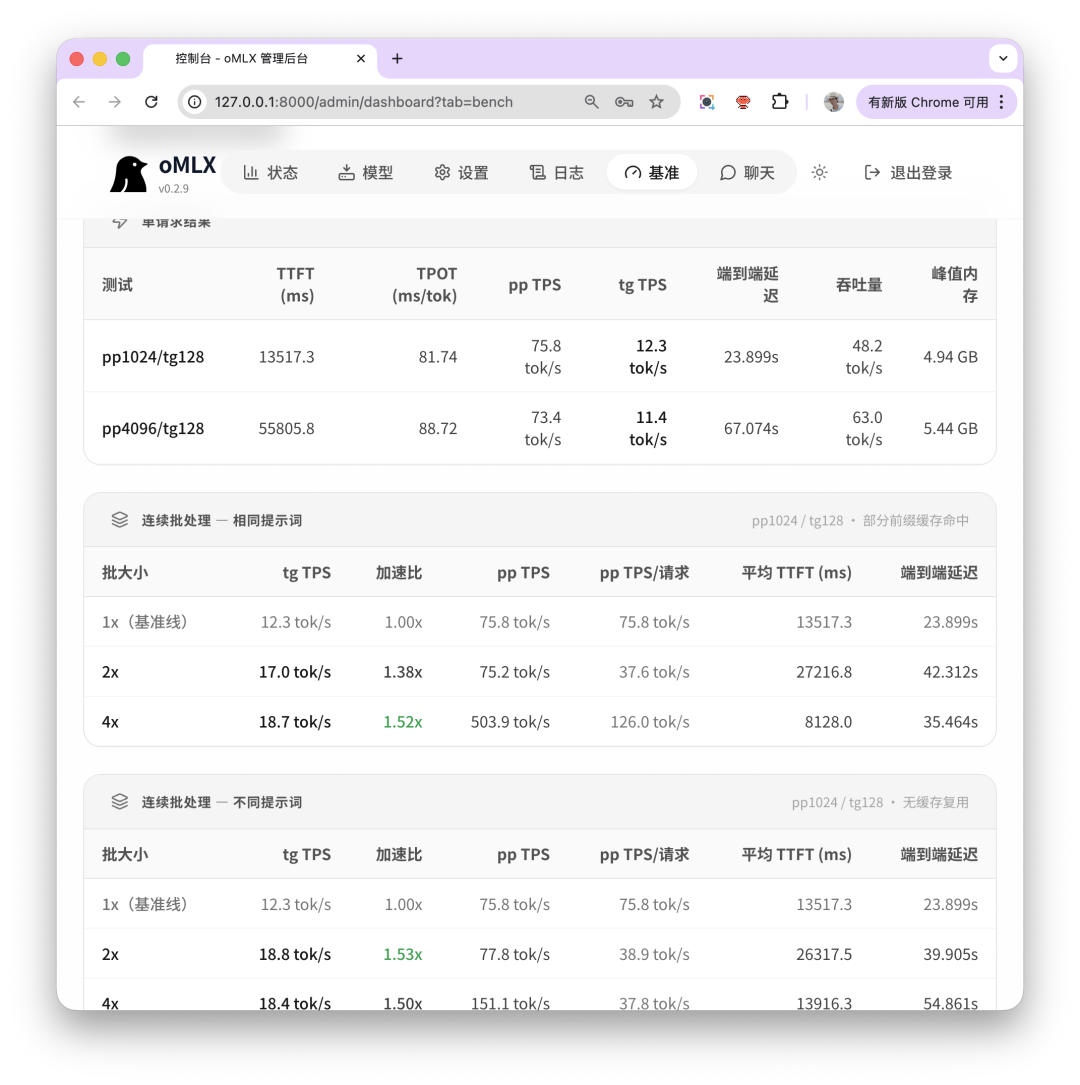
Here are the results of running DeepSeek R1 8B with oMLX's built-in benchmark tool, for reference:
Summary
oMLX is a local large language model service deeply optimized for Apple Silicon, and its core innovation is persisting the KV Cache to SSD.
This technique keeps "hot data" in memory while storing "cold data" on a high-speed solid-state drive, which significantly cuts time to first token and greatly relieves memory and swap pressure.
In tests on a 16GB M1 Mac mini, compared with Ollama, oMLX used memory more steadily and used far less swap. At the same time, it supports efficient multi-tasking and continuous batching, and it performs more stably and efficiently in multi-turn and concurrent scenarios.
For Mac users — especially on memory-limited machines like the 16GB models — oMLX makes full use of Apple's hardware features to deliver a local AI experience that is smoother, more reliable, and faster to respond than conventional options like Ollama and LM Studio, making running local large models on a Mac far more practical.
Related posts:
Shrimp Farming Weekly 01: A Week of Matching Wits with AI Tools
Can Ordinary People Deploy the DeepSeek-R1 Model Locally?
Pitfall Guide to Running Large Models on a Mac Mini
#tags #oMLX #Mac #LocalLLM #AppleSilicon #AI #Benchmarks #SSDKVCache #Ollama #LMStudio #OpenSourceTools