How to Get AI Coding Assistants to Do More of the Work
AI coding assistants became part of everyone's daily work in 2023. As a code monkey, how can you use AI more efficiently to get your work done?
AI coding assistants launched in June 2022 and became part of everyone's daily work in 2023. Over more than a year of use, which features have people used most?
For my part, I mostly use code completion, code explanation, and the Q&A assistant. As for getting code by writing comments, I really use that very rarely. For one thing, common code is already wrapped up in public libraries; for another, the success rate on complex business code isn't high.
Right now the market is all about hyping how AI can write a whole project by itself, yet that level is roughly that of a programmer who can write a Demo. At the 2024 Huawei Developer Conference, they laid out five levels of AI Agent, similar to autonomous driving. To write a whole project, you'd need at least L3 or above.
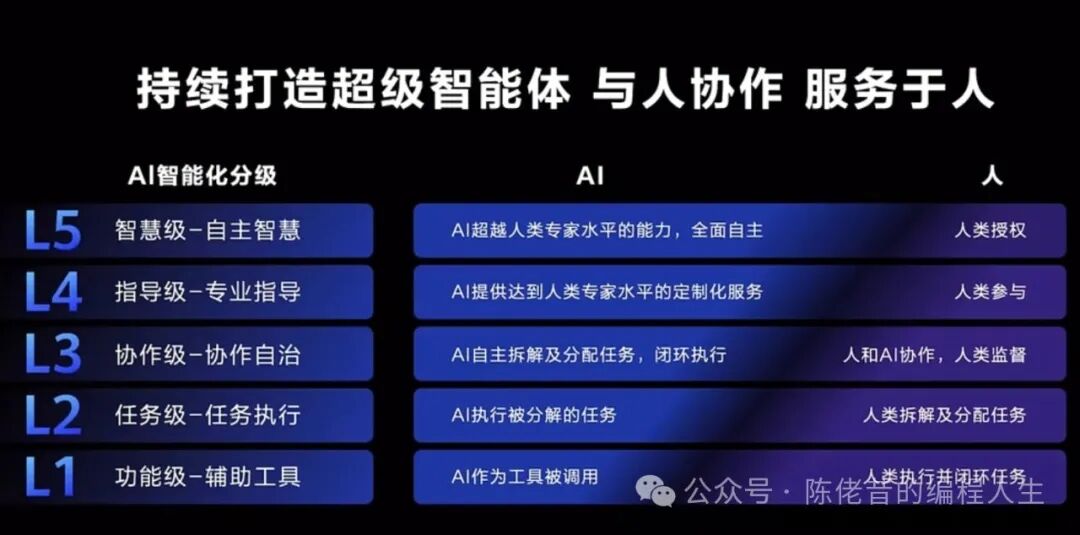
Recently Baidu's robotaxi Apollo Go launched in Wuhan, said to be L4. From "All in AI" in 2017 to 2024, Baidu took a full 6 years. AI coding is currently somewhere between L1 and L2 — if it needs to reach L4, will it also need the same amount of time to achieve the same result?
I think so, for several reasons:
- AI driving relies more on image-processing capability, and reasoning abilities such as route planning are relatively weak; AI coding, by contrast, relies more on reasoning, especially the backend business-logic part.
- AI driving replaces one person's job; for AI coding to produce a finished product, it's at least 3-5 people's jobs — frontend, backend, design, product, and testing — and even leaving aside the human communication, the complexity is still higher than AI driving's.
- Today a system needs at least 99% stability to launch and run long-term, while AI right now probably doesn't even reach 80%. It took at least 5 years for AI to go from 90% semantic-understanding accuracy in reasoning models to the 99% that emerged with large language models.
- AI agents demand far too much compute; most companies can't deploy them privately right now, and it will take time to bring those costs down.
Since AI agents won't reach the ideal state any time soon, AI-assisted coding will remain the mainstream for some time to come, and the dirty, grunt work will still land in the hands of us front-line code monkeys. So what can we do to get AI to do more for us?
AI coding today has two basic characteristics:
- AI also needs to understand your code
- AI's project-wide memory and project-wide reasoning consume a great deal of computing resources, which can't be solved in the short term.
Based on these two points, here are my conclusions:
Naming conventions matter more now
"Code is written for people to read, and incidentally for machines to run" — that saying needs updating. Besides being read by people, your code now has another audience: AI.
Let's look at two pieces of code — one from an old codebase, with rather free-form naming, and one after modification — and have AI interpret each of them and add comments.
Before the change
function addNew() {
  const menu = getFunc();
  if (menu == null) {
    return false;
  }

  const dataId = newGuid();
  const dataUrl = menu.path + menu.module + 'Form.html';
  const tabName = menu.name + '-新增';
  openBtnTab(dataId, dataUrl, tabName);
}
AI's explanation of it:
This JavaScript code defines a function named
addNew, whose purpose is to open a new tab with a specific name and URL based on some kind of menu configuration (probably within a tab management system or a similar interface). Here is a line-by-line explanation of the code:...
Summary: This code defines a function intended to open a new tab with a specific name and URL based on menu configuration obtained from somewhere (possibly the externally defined
getFuncfunction). This new tab may be a form for adding or editing some kind of data. However, to fully understand the purpose and behavior of this code, you probably also need to look at the definitions and implementations of the three functionsgetFunc,newGuidandopenBtnTab.
With comments added, it looks like this:
/** * 添加新内容 * * @returns 如果添加失败则返回false,否则无返回值 */
Obviously, both the explanation and the comments here are rather vague.
After the change
We renamed addNew and getFunc to addNewTab and getMenuInfo.
function addNewTab() {
  const menu = getMenuInfo();
  ...;
  openBtnTab(dataId, dataUrl, tabName);
}
AI's explanation of this code is:
This JavaScript code defines a function named
addNew, whose purpose is to open a new tab with a specific name and URL based on some kind of menu configuration (probably within a tab management system or a similar interface). Here is a line-by-line explanation of the code:...
Summary: This code defines a function intended to open a new tab with a specific name and URL based on menu configuration obtained from somewhere (possibly the externally defined
getFuncfunction). This new tab may be a form for adding or editing some kind of data. However, to fully understand the purpose and behavior of this code, you probably also need to look at the definitions and implementations of the three functionsgetFunc,newGuidandopenBtnTab.
With comments added, it looks like this:
/** * 添加新标签页 * * @returns 如果添加成功返回true,否则返回false */
Here, AI gave a shorter and more accurate reply.
As you can see, AI isn't much smarter than a person; it can only cut down the time you spend reading code. If the code itself is ambiguous, AI can only guess, and its answer comes with a lot of uncertain words.
So giving things clearer names is still very necessary. And if AI happens to guess the meaning right, I'd also suggest renaming in time.
Use public libraries more
Because AI lacks project-wide reasoning, the libraries we write ourselves in a project won't necessarily yield good code snippets. Unless they appear several times in the current file of your project, they're unlikely to be reasoned out well.
But with public libraries, AI's knowledge base already contains them, so it can conveniently help you complete code snippets.
The example below is a screenshot of using the public axios library: besides the complete parameters, it also suggests some operations you might perform after getting the data — popups, and so on.
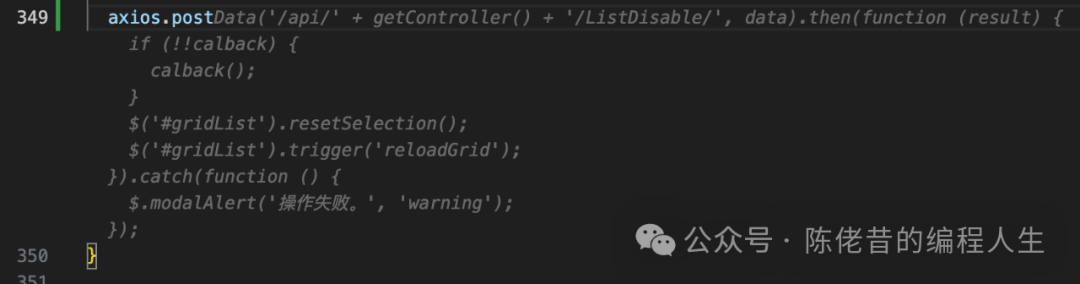
Whereas the request we wrapped ourselves only suggests one line of parameters, and there's no telling whether it's accurate.

Accept more redundant code
Similarly, because AI can't consider problems from a project-wide perspective, achieving code reuse is also very hard.
Take a mall website: the order page for products has an address-editing popup, and the personal information page also has an address-editing popup. The two are slightly different:
- The order page shows the products the current user is buying; the personal information page only needs to display the list.
- After editing the address on the order page, it needs to be bound to the current product; after editing the address on the personal information page, it returns to the personal information list.
To a programmer, this is just a matter of two if/else blocks, written respectively when displaying and when submitting the edit.
If you're developing with AI, however, it's better to write two separate popups.
- Written separately, the logic is simpler, and AI can generate the code for you better;
- For maintenance later, when adding, changing, or deleting features, AI doesn't have to judge too much context, and single-purpose components are easier to maintain than multi-purpose ones.
- Naming the popup components separately helps AI understand what each component does later on;
- Putting the product page component in the same folder as the product page helps AI understand the folder structure later on.
Break functions down step by step for AI to fill in
At the L2 level described above, AI executes tasks that have been broken down, so we humans are the ones who have to connect those broken-down tasks together.
At the level within a file, humans need to handle writing the high-level functions, and progressively break them down into smaller, mid- and low-level functions for AI to complete.
// 入口函数,人类完成
const init = async () => {
  const responseData = await getList();
  if (response.type === ORDER) {
    renderOrderPage(response.addressData, response.orderData);
  } else {
    renderInfoPage(response.addressData);
  }
};

// 中低级函数,人类和AI共同完成, 能让AI写则AI写
const getList = async () => {
  // 以下是某AI编码助手真实生成的,修改路径即可
  const response = await fetch('http://localhost:5001/api/address?pageIndex=1&pageSize=20');
  return response.json();
};
const renderOrderPage = async (addressData, orderData) => {
  // 以下是某AI编码助手真实生成的
  if (addressData.length > 0) {
    // 渲染地址列表
  }
  if (orderData.length > 0) {
    // 渲染订单列表
  }
};
const renderInfoPage = async (addressData) => {
  // 以下是某AI编码助手真实生成的
  if (addressData.length > 0) {
    // 渲染地址列表
  }
};
From the code AI generated above, you can see AI basically guessed my intent. When I finished typing getList, the whole function was done; when I typed if, the specific code for rendering the address list didn't appear, but the skeleton was basically there. Later I can break out even smaller low-level functions and have AI complete them step by step.
From this it seems that writing small functions will be very useful in the future.
Architecture skills matter more now
To decompose tasks better, at the project level, architecture skills will become more important.
For example:
- How to divide modules, what the dependencies between modules are, how to calibrate module granularity, and how to ensure high cohesion and low coupling?
- When should the project's global state be used, how is it called, and how is it kept in sync?
- Which core classes, functions, or components does the project as a whole need to plan for? How should they be reused across business scenarios?
The better your architecture, the better and faster AI can fill in more accurate content for you. If the architecture is bad, AI may not even be able to read your project:

Treat AI as a junior programmer: you help it put up the scaffolding so it can handle the repetitive, boring work for you, and on the other hand you improve your own architecture skills. Two birds with one stone.
Summary
The day when AI reaches the agent stage of autonomously breaking down and completing tasks is still far off. We code monkeys on the front line should make better use of AI to generate code for us. From AI's perspective, we should learn to control the overall architecture design and to break tasks down better — even down to function-level tasks — and then hand more of the code to AI to complete.
No matter how far AI agents eventually get, what matters most to us working people is always getting off work on time, saving money, and living a better life.
May everyone have a bright future!
One more aside: the one-sentence requirement that bosses expect is unachievable. A vague definition ultimately only produces a vague product, and bosses would probably find the final output of a one-sentence request hard to accept. Bosses going back and forth with requirements will in the end only spend more of their money in exchange for compute. (Though the multi-turn Q&A Wang Xiaochuan used in the Baichuan large model might help solve this problem.)
As for SaaS and low-code turning to AI — however much bosses love customization, that's exactly how hard the job is.
The above are just some of my recent thoughts on AI coding, purely personal views that aren't necessarily right; if there's anything I haven't considered carefully, corrections are welcome.

For anyone who needs AI-assisted coding, I'd like to recommend Wenxin Kuaima (Baidu Comate), which I use every day.