Goodbye Token Anxiety: How I Do AI Coding on a Minimal Budget
If your AI IDE plan quota is never enough, look here~ I'll show you how to get tasks done with fewer Tokens. I've used these few tricks to get through nearly half a year of complex development~

I often see netizens complaining: the plan quota on AI coding tools is just not enough! Even if you buy the most expensive plan, it often runs dry before the end of the month.
As an old programmer who's been writing code for years, for the past six months I've been working on a multi-platform project — mobile (Android + iOS), H5 and PWA, web, plus an admin backend — so I'm definitely a heavy Cursor user.
But would you believe it? I've always used the lowest $20 plan, and every month I even have some left over.
Along the way I've accumulated a pile of practical little tricks. Today I'll chat through them with you, hoping they help!
⚠️Note: these methods aren't only for Cursor — they work just as well for Claude Code, Trae, Kiro, and other AI coding tools!
The most core point is really five words: control the context.
Because when AI handles a request, the longer the context gets, the more Token consumption grows — not gradually, but like a snowball rolling bigger and bigger! Too much context not only slows down responses, it also makes your plan quota drain fast...
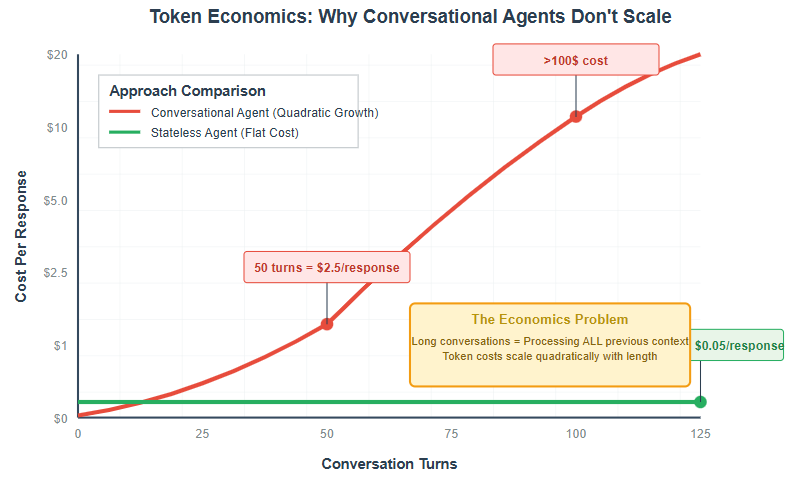
So our strategy is: save where you can, give where you must — cut unnecessary context, but feed it precisely at the key moments!
## 1. Reduce unnecessary context
### 1. Split whenever you can: break components apart clearly
Splitting components by hand used to feel like a hassle, and I worried about over-engineering. But now with AI helping, it's much easier! My experience: split whenever you can, don't hold back.
Even a page that looks simple should be built by assembling components as much as possible, pushing the concrete business logic down into each child component. For example, with the mobile form and the email form on the login page below, I'd decisively split them into one page with two components.

You can also simply use the rule of splitting a component once it goes over 300 lines; set the exact threshold to whatever suits your own habits.
In short, remember: small is beautiful!
### 2. One topic per chat: don't make AI multitask
Never expect to solve all your problems in a single conversation! It's just like fixing bugs — one bug, one commit, no interference between them.
The same applies to AI: one conversation handles only one feature or one type of problem, at most grouping highly related issues together.
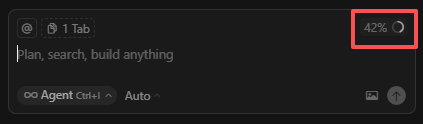
The new Cursor interface now shows the context usage percentage. My conversations rarely exceed 50%, so everything stays in a crisp range.
### 3. Batch tasks: save up a wave, then handle it
For needs like multilingual support, early on you can absolutely do just Chinese and English. There's no need to have AI generate multilingual key-value pairs every time you write code — that burns way too many Tokens!
Once the main functionality is done, hand the multilingual adaptation to AI in one go, or write a script to batch-extract and replace.
The same goes for other batch tasks — concentrate on nailing the core features first, and deal with the odds and ends later.
## 2. Provide more precise context
### 1. Get it right at the start: build a good "model home"
Everything's hard at the beginning, but if you start well, everything after is twice the result for half the effort! My experience: at the very start, be generous with your time and craft a perfect "model home."
For example, when the frontend integrates a backend API, first carefully wrap the axios interceptor, write a complete api module, and plan out all the TypeScript type definitions. Then when you write other endpoints later, just have AI follow this model!
Practical example:
请参考 @/api/user.ts 的封装方式,帮我对接首页的数据接口,
返回类型参照 User 类型定义
That way AI understands your coding conventions and style precisely, instead of freely improvising. One high-quality model home makes all your later development as easy as copy-paste, with consistent style and fewer bugs.
### 2. @ files precisely: don't make AI fish a needle out of the sea
Many AI coding tools now support the @ file feature, which is practically a magic tool for saving Tokens!
Even if at the start of a project AI has already walked through the whole folder and written its docs, it still burns tokens searching. And if you're still writing in Chinese, AI has an even harder time guessing which file you mean.
So rather than letting AI blindly search the whole project, just tell it directly which file to look at.
For example, if you want AI to reference some component's styles:
Correct example:
请参照 @/components/UserCard.tsx 的卡片样式,
为当前组件添加阴影效果和圆角
Wrong example:
- "参考其他卡片组件的样式改一下"(太模糊了!)
- "参考用户卡片组件的样式改一下"(还需要 AI 去找用户卡片)
3. Give enough information when reporting errors: don't make AI guess riddles
When you hit a bug, never just toss an error message at AI and call it done. Better to feed it the call stack, the relevant code snippets, and even the possible data state. The more complete the information, the more accurately AI can pinpoint the problem.
Example:
Uncaught Error: xxx. // 仅提供这一行错误信息是不够的
    at ei (xxx.js:329:80666)
    at Go (xxx.js:329:79164)
    at Ai (xxx.js:329:121368)
    at Is (xxx.js:329:111153)
    at Ds (user-center.tsx:329:111081) // 追踪到你的页面的具体行数
4. Use more precise terminology
Another small trick: describe problems with clear, consistent nouns as much as possible.
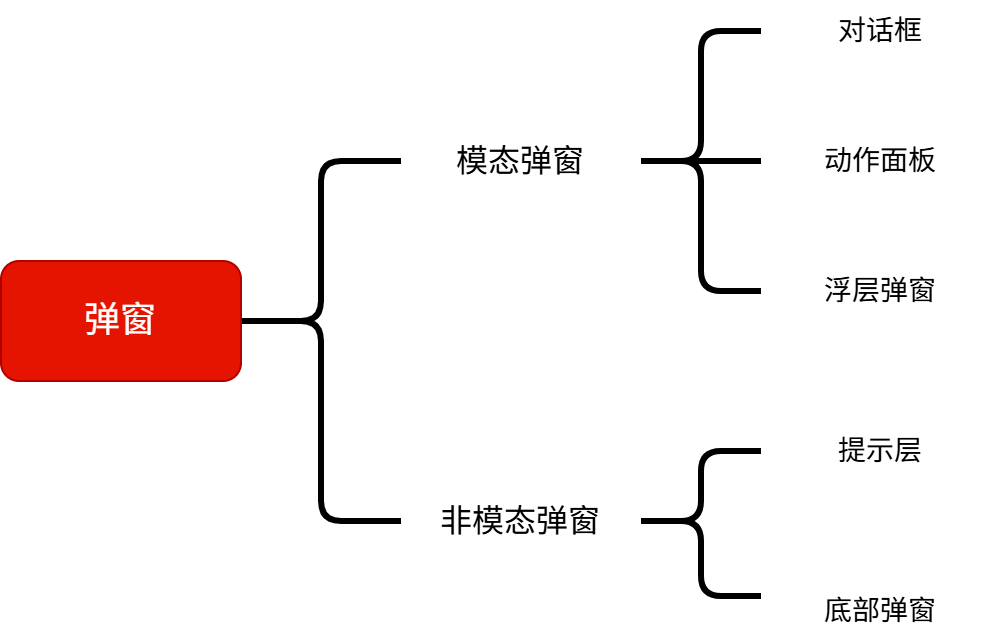
Do you want an "overlay," a "modal," or a "Toast notification"? The more precise the terminology, the more AI's output matches your expectations, saving you from going back and forth.
## 3. Make good use of code completion; you don't have to ask AI about everything
Finally, don't forget that besides chatting, AI tools also have a super useful code completion feature!
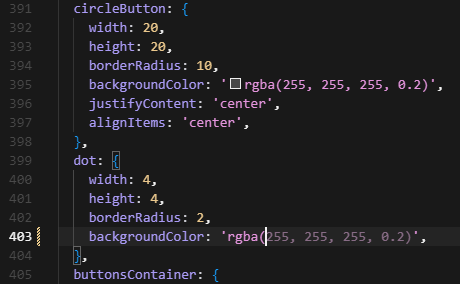
For extremely simple changes — like changing some text, adjusting 1 pixel of spacing, or tweaking a color value — there's no need to open a dedicated conversation to ask AI. As an experienced programmer, just locate the code and change it by hand!
And once you've changed one spot, AI's completion engine often automatically handles the other similar spots for you, which is really convenient. That saves Tokens and boosts efficiency — why not?
## Summary
When it comes down to it, controlling context is the core secret to mastering AI coding tools~
You need to learn to "subtract" — reducing the context real estate taken up by irrelevant code and redundant conversation; and you also need to know how to "add" — providing clear, specific background information at the key moments.
Master these little tricks, and within your limited Token quota you'll not only watch your development efficiency climb, you'll also be like me — clocking off on time and enjoying life!
Saving is earning. Give it a try — you can be a "low-budget master" of AI coding too! 🚀