Week 12: Whisper Failed, So I Built a Local Cantonese ASR App with Qwen3
I found that the tooling around Cantonese is really thin on the ground. Take ASR (speech-to-text): the technology has been around for years, yet there's still no genuinely good tool. So I built one myself.
I'm from Guangdong, so I have a real affection for Cantonese. But I've found the supporting tools far too scarce. Take ASR (speech-to-text): the technology has been developing for years, yet there's still no really usable tool.
Even Whisper, which most people pick, only gives so-so recognition on Cantonese with its largest model — wrong words, missing sentences, garbled text. On very long audio, anything past five minutes goes completely wrong, and there are so many bugs it's unusable.
I also considered iFlytek's paid cloud service, but for an occasional user like me, a subscription isn't worth it.
Then I thought of Qwen's audio and video quick-read feature, which I'd used before: high recognition accuracy, Cantonese support, and it can handle content up to six hours long. Could a local Qwen ASR match the online results?
I quickly wrote a small Demo to test it, found it really was better than Whisper, and decided to turn it into a macOS app I'd use regularly.
The app is open source on GitHub:
https://github.com/dcchanInSz/qwen-transcribe
My thinking this time was very direct: use AI to help me write this AI app. I didn't try to finish it in one go; instead I broke the task into small modules and moved forward step by step with AI's code-generation ability.
The process went roughly like this:
1. Rework the Demo to support reading local audio
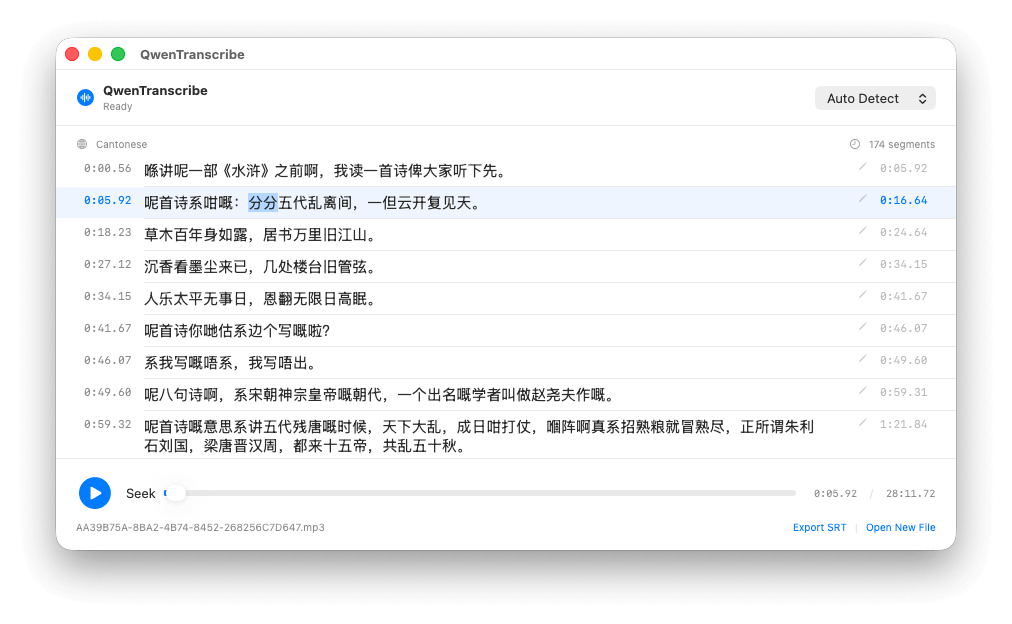
I started from the Demo I'd just built and made it able to read the user's local audio files (MP3, WAV, or FLAC). The AI wired up the file-picker code for me and handled the audio decoding logic.
2. Add playback and proofreading
With audio loading in place, the next step was visualization. I added text that scrolls as the audio plays, which made proofreading much easier.
3. Add chunking
Next came the core feature — audio chunking. At first everything after ten minutes was simply gone; then I added chunking and found it didn't work; in the end the AI discovered that Qwen ASR supports chunking itself, and it had it debugged in no time.
4. Add settings and model download
Finally, I added a settings dialog with model download integrated, letting users download the AI speech-recognition model from a remote server.
That's iterative thinking at work: solve one small problem at a time, then refine step by step. Every time I finished a feature, I'd test and adjust it to make sure it ran reliably.
In the end, I had this Swift desktop app.
A quick summary: through this attempt I came to understand more deeply that only you can write the app that suits you best. Especially for niche needs, the software available on the market often can't cover them fully. If you have a need like that, why not have a go at building it yourself.
Writing an AI app with AI really is fast! The debugging this time wasn't all smooth sailing — whether in understanding Swift or understanding Qwen ASR, the AI needed several attempts before it produced correct and satisfying results. But that shouldn't be an obstacle; instead, see it as a chance to try things faster and fix mistakes faster.
Don't be afraid of the hassle — just iterate step by step. When building an app, you don't need to get it perfect in one shot, or you'll often get stuck on some detail and be unable to move forward. I later learned to build a minimal usable version first, even if it only has the basic features. That way the app keeps growing through real use, which turns out to be more practical than designing for every eventuality from the start. Remember: perfection comes from iterating, not from designing.
Right now I'm still working on subtitle translation.
Compared with an ASR model, the LLM I'm calling this time is a bit more complex. I ran into the core problem of LLM development: insufficient controllability.
For example:
Original timeline (sentence by sentence):
00:01  Hello world
00:03  I am a developer
00:06  This is a test
What I expect is a translation that maps sentence by sentence too:
00:01  你好世界
00:03  我是一个开发者
00:06  这是一个测试
But the LLM often gets creative on you:
00:01 你好世界,我是一个开发者。这是一个测试。
Three sentences merged into one, and the timeline is a total mess.
I'm still feeling my way through this one. If you've dealt with it before, I'd welcome your tips. I'll report back once I get it working.