Front-End Code Layering in 7 Steps
Layering code makes each piece's responsibilities clear, and it noticeably improves maintainability. But in real projects this is mostly something the back end does — can the front end do it too? Let's try it out together...
Video walkthrough: 7 steps to front-end code layering — Bilibili
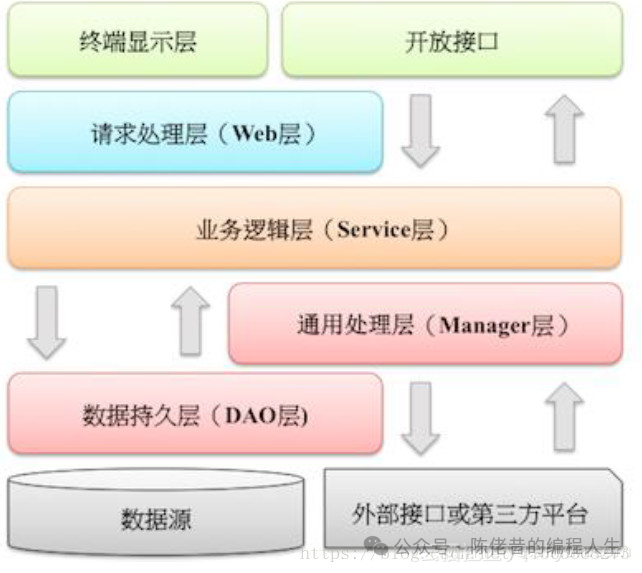
Reading through some materials, I found the back-end idea of layering really interesting. Split the code into several layers, define what each layer does, and responsibilities become clear while maintainability improves noticeably. That's why back ends even write this into their standards.
Here's a diagram of Alibaba's code layering standard:
Front-end project architecture may not be that complex, but open up a project folder and you'll spot plenty of problems.
Take a Vue project as an example. Most of our files sit in the src/views folder, and the other folders at the same level as views contain less code than a single business component. The sub-folders, in turn, usually hold nothing but .vue files and a components folder. Clearly, projects like these are just one-shot Vue jobs — everything crammed in.
So can the front end borrow this layering idea and split its code apart? Like AngularJS back in the day, where the MVC layers were set up properly and everyone just filled in the corresponding content? Recently I gave this kind of code layering a try. Here's how the experiment went.
Suppose the project has an orders page with the following directory structure:
- views
- orders
- index.vue
- components
The code in index.vue looks like this:
<template>
  <div class="search">
    <!--省略搜索表单-->
    <button click="getList">搜索</button>
  </div>
  <div class="list" v-for="item in list">
    <!--省略列表内容-->
    <button click="handleDelete">删除</button>
    <button click="edit">编辑</button>
  </div>
</template>

<script>
import api from '@/api';
export default {
 data() {
   return {
     loading: false,
     searchForm: {},
     list: [],
   }
 },
 methods: {
  async getList() {
    this.loading = true;
    const result = await api.getList(this.searchForm);
    this.list = result.data;
    this.loading = false;
  },

  handleDelete(item) {
    // 做一些操作,然后更新列表
    this.getList();
 },

  edit(item) {
    // 做一些操作,然后更新列表
    this.getList();
  },
 }
}
</script>
As you can see from the code, this is a simple CRUD page.
1. Unify the naming
The page has only three buttons, yet the functions are named every which way. So step one is to unify them: here we give every method that a page element calls the handle prefix.
<template>
  <div class="search">
    <!--省略搜索表单-->
    <button click="getList">搜索</button>
  </div>
  <div class="list" v-for="item in list">
    <!--省略列表内容-->
    <button click="handleDelete">删除</button>
    <button click="handleEdit">编辑</button>
  </div>
</template>

<script>
import api from '@/api';
export default {
 data() {...},
 methods: {
  async getList() {...},

  handleDelete(item) {
    // 做一些操作,然后更新列表
    this.getList();
  },

  handleEdit(item) {
    // 做一些操作,然后更新列表
    this.getList();
  },
 }
}
</script>
Once the delete and edit buttons share a naming scheme, things do look more comfortable. But the careful reader will notice that getList can't be renamed, because it is both the method a button click executes and the method other events call indirectly. One method, several purposes — that breaks our rule about methods invoked by page elements.
2. Add an intermediate method
If we're to follow the unified naming rule for page-element methods, the only option is to add an intermediate method, handleSearch, which then calls getList.
<template>
  <div class="search">
    <!--省略搜索表单-->
    <button click="handleSearch">搜索</button>
  </div>
  <div class="list" v-for="item in list">...</div>
</template>
<script>
export default {
 data() {...},
 methods: {
   async getList() {...},
   handleSearch(){
     this.getList();
   },
   ...
 }
}
</script>
Readers who've got this far may feel it's a pointless extra step.
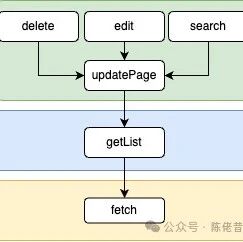
But in fact, this is where our code gets graded into levels. Under a strict code grading system, each level may only call the code in the level directly beneath it: skipping levels is not allowed, and a composite function may not call functions from several different levels at once.
function 高级() {
 // 不允许跨级调用低级的函数
 中级1()
 中级2()
}

function 中级1() {
 // 不允许反向调用高级的函数
 低级()
}

function 低级(){
 // 不允许反向调用中高级的函数
 doSomething()
}
Borrowing that concept, we treat button operations as high-level methods and back-end interaction as the low-level method. So inside button operations we don't talk to the back end directly.
点击按钮 --> 按钮操作 -->与后端交互
Grading has one big benefit: when we read the code, our mind doesn't have to jump back and forth between levels — which is especially useful in complex business development. Take the search button here. Converting the data dictionary when the search form is submitted, formatting dates, debouncing the request, handling the state after the request, extracting the data — if all of that went into getList, then besides the code getting bloated, business-logic handling, front-end event handling and back-end data operations would all be coupled together. A person's thinking has to hop repeatedly between those kinds of operations, which is disjointed, and that makes reading the code extremely awkward. It's also the reason we so often get a headache when reading code that hasn't been graded.
The grading is done. To get to layering, we can now try moving the back-end interaction out into a separate file.
3. Pass data in, don't modify global data
To make a file independent, its functions must first be independent and not depend on outside data. In Vue 2, anything prefixed with this. is plainly global data belonging to the current page.
<template>...</template>
<script>
export default {
 data() {...},
 methods: {
   async getList(searchForm) {
     this.loading = true;
     const result = await api.getList(searchForm);
     this.list = result.data;
     this.loading = false;
   },
   handleSearch(){
     // handleDelete、handleEdit修改同此
     this.getList(this.searchForm);
   },
  ...
 }
}
</script>
Here we change this.searchForm so that it's passed in from outside. Every method that calls getList passes this.searchForm along as an argument.
4. Deep-copy the incoming object data
In JavaScript, when the data you pass in is an object, what actually gets passed is a reference. Modify that object directly and the object referenced elsewhere on the page changes too. That's a common cause of front-end data bugs, so it's best to deep-copy it before use.
<template>...</template>
<script>
export default {
 data() {...},
 methods: {
   async getList(searchForm) {
     const searchInfo = JSON.parse(JSON.stringify(searchForm));
     this.loading = true;
     const result = await api.getList(searchInfo);
     this.list = result.data;
     this.loading = false;
   },
  ...
 }
}
</script>
Here JSON.parse(JSON.stringify(...)) deep-copies searchForm and assigns the result to searchInfo, which is used for the search. If you have a deep-copy method you prefer, you can use that instead.
After the refactor, two this references remain. Let's keep eliminating them.
5. Hand page-data handling back to a higher-level function
Let's grade the code once more, using a mid-level function that is dedicated to updating the page's data changes.
<template>...</template>
<script>
export default {
 data() {...},
 methods: {
   async getList(searchForm) {
     const searchInfo = JSON.parse(JSON.stringify(searchForm));
     const result = await api.getList(searchInfo);
     return result && result.data;
   },
   async updatePage() {
     this.loading = true;
     this.list = await this.getList(this.searchForm);
     this.loading = false;
   },
   handleSearch(item) {
     this.updatePage();
   },
   handleDelete(item) {
     ...
     this.updatePage();
   },
   handleEdit(item) {
     ...
     this.updatePage();
   }
 }
}
</script>
Here we add an updatePage function that handles the loading state and the page's list data, taking over all the page operations that had been tangled up with getList. getList processes the data returned by the request and hands it back to updatePage. Thanks to async and await, this step works out nicely.
Now getList no longer contains the this keyword — it is truly independent. At this point the grading looks like this:
点击按钮 --> 按钮操作 --> 页面处理 --> 与后端交互
The code has taken shape. Next we can think about layering.
6. Move request handling into its own file
We move the getList method into a file, at which point the directory structure looks like this.
- views
- orders
- index.vue
- getList.js
- components
It debugs cleanly, so the first pass of the refactor is done.
7. Consolidate the request-handling layer
Beyond getList, we start applying steps 1–6 to other methods and other pages, and our back-end interactions pile up. So we consolidate them into a directory at the same level as views. If no better name comes to mind for now, just call it the models layer (there's no strict definition anyway 😜).
- models
- orders
- index.js
- views
- orders
- index.vue
- components
With that, we've abstracted a whole layer of the project dedicated to back-end data interaction.
Summary
In this exercise we used the idea of code grading to gradually pull the back-end interaction code out on its own, and ended up with a Models layer — which is how code layering got done.
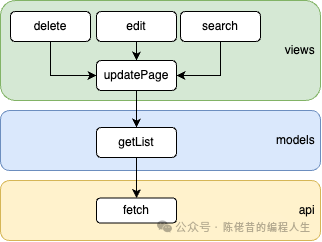
In real development, business requirements tend to be more complex. Using the ideas of grading and layering, working out and planning what each level and each layer should do often makes both our thinking and our code clearer, and makes maintenance easier down the road.
For example, later on we can do some processing in the models layer while data is being exchanged with the back end, avoiding some of the problems that make the back end throw errors. At the same time, we can put fallbacks in place for what gets returned to the front end, which likewise keeps a front-end error from breaking the page.
// 重构后的 getList
import { pick } from "lodash-es";

export getList = async (searchForm) => {
 const searchInfo = JSON.parse(JSON.stringify(searchForm));
 // 仅提交后端需要的数据
 const submitKey = ['orderId', 'productName', 'startTime', 'endTime',];
 pick(searchInfo, submitKey);
 const result = await api.getList(searchInfo);
 if (result && result.data) {
   return result.data
 }
 // 避免 undefind
 return [];
}
That's this round of code layering. I hope this write-up is of some help, and I hope you can put code grading and layering to work in your own projects to raise the quality of your code.
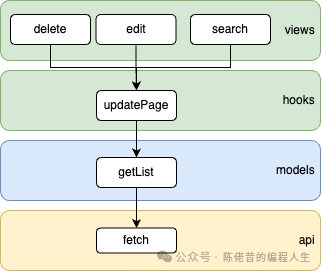
All the examples in this article use Vue 2. If you're interested, try it out in Vue 3 as well — with the Composition API / useHook it should be even simpler. The code structure might look something like this:
References
- How should good code be layered?
- "101 Ways to Improve Code Quality"