Bluetooth Communication: Everything You Need to Know
Bluetooth, as a device protocol, is a common hardware category. What Bluetooth knowledge do you actually need? There are so many Bluetooth versions—how do you tell them apart? How do you develop and debug? This article may clear things up for you.
Bluetooth categories
Bluetooth is divided into Bluetooth Classic and Bluetooth Low Energy.
Most devices today are Bluetooth Low Energy. Bluetooth Smart is also a type of Bluetooth Low Energy. In addition, there is Bluetooth Smart Ready, which is compatible with both.
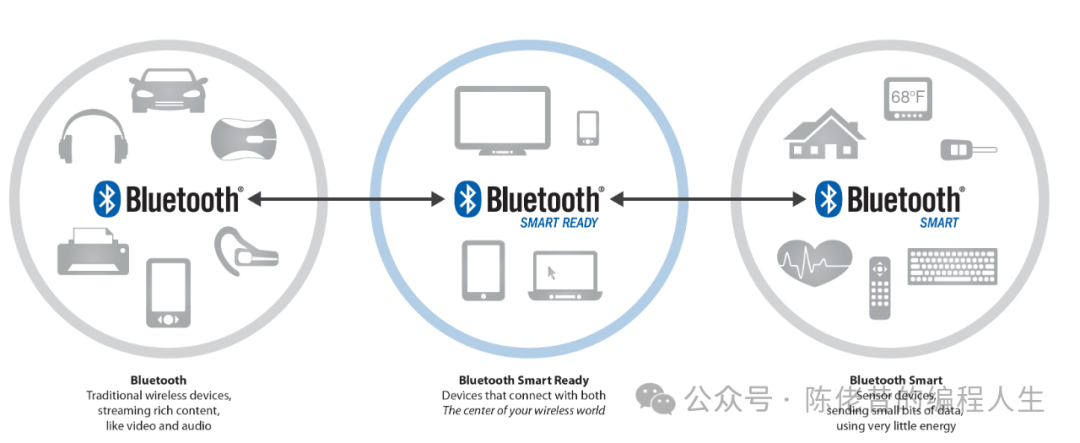
Bluetooth Classic is mostly used to carry rich content, including audio, video, and other multimedia.
Bluetooth Low Energy, on the other hand, is used to transmit smaller amounts of data, as on today's smart devices; but with certain technical workarounds, it can also be used to carry audio (LE Audio).
Important Bluetooth version numbers:
- Bluetooth 4.0 introduced the concept of BLE.
- Bluetooth 5.1 introduced positioning services.
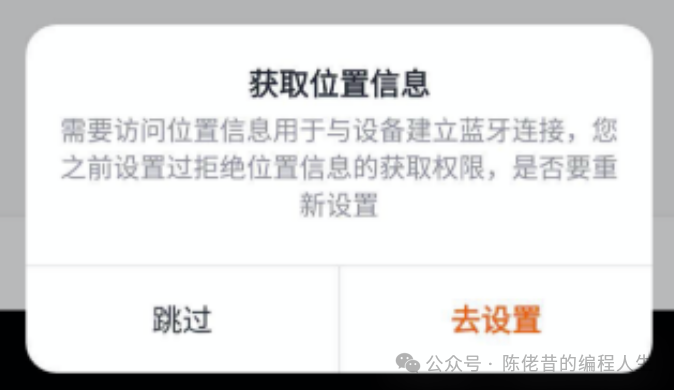
Why does scanning for Bluetooth devices require location permission?
Bluetooth 5.1 added Bluetooth direction finding, which, combined with existing Bluetooth positioning schemes, can improve positioning accuracy down to the sub-meter level. This requires the app to be able to access the device's location information in order to provide more precise positioning services.
On Android 6.0 / iOS 13 and later, performing a BLE (Bluetooth Low Energy) scan requires requesting location permission, so that features such as discovering nearby Beacon devices can work. This is because once a Bluetooth device connects to a phone, it can assume that its own location is the phone's location—effectively obtaining the phone's location information indirectly—so location permission must be requested.
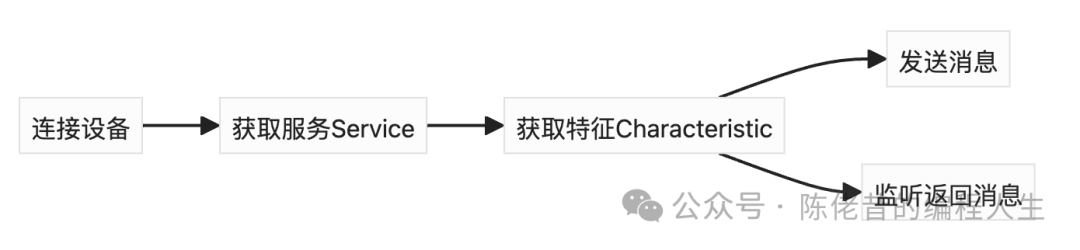
Bluetooth services and characteristics
To communicate with Bluetooth, you need to obtain the device's services (Service) and characteristics (Characteristic).
A service is a collection of functions provided by a Bluetooth device; you can think of it as an application or functional module running on the device. A service defines a set of characteristics (Characteristic) that other devices can access.
A characteristic is a specific data item within a service; it contains data that can be read (Read), written (Write), or notified (Notify). Characteristics are the concrete implementation details of a service.
To communicate with a service or characteristic, you need to connect using a UUID.
Service UUIDs and characteristic UUIDs follow the same encoding rules, usually 0000-0000-1000-8000-00805F9B34FB, abbreviated as 0x.
Base service UUIDs are usually 0x18**, like the 2 services below. Custom service UUIDs just need to avoid this encoding.
- Generic Access Service:
00001800-0000-1000-8000-00805f9b34fb - Generic Attribute Service:
00001801-0000-1000-8000-00805f9b34fb
Base characteristic UUIDs are usually 0x2a**, like the 2 characteristics below. Custom characteristic UUIDs just need to avoid this encoding.
- Device Name:
00002a00-0000-1000-8000-00805f9b34fb - Appearance:
00002a01-0000-1000-8000-00805f9b34fb
Bluetooth debugging
You can debug with the open-source nRF Connect.
- Android version: https://github.com/NordicSemiconductor/Android-nRF-Connect/releases
- iOS version: https://github.com/NordicSemiconductor/IOS-nRF-Connect/releases
- Desktop version: https://github.com/NordicSemiconductor/pc-nrfconnect-launcher/releases
Bluetooth operations are fairly simple, but each app's design differs; here's an example using Android:
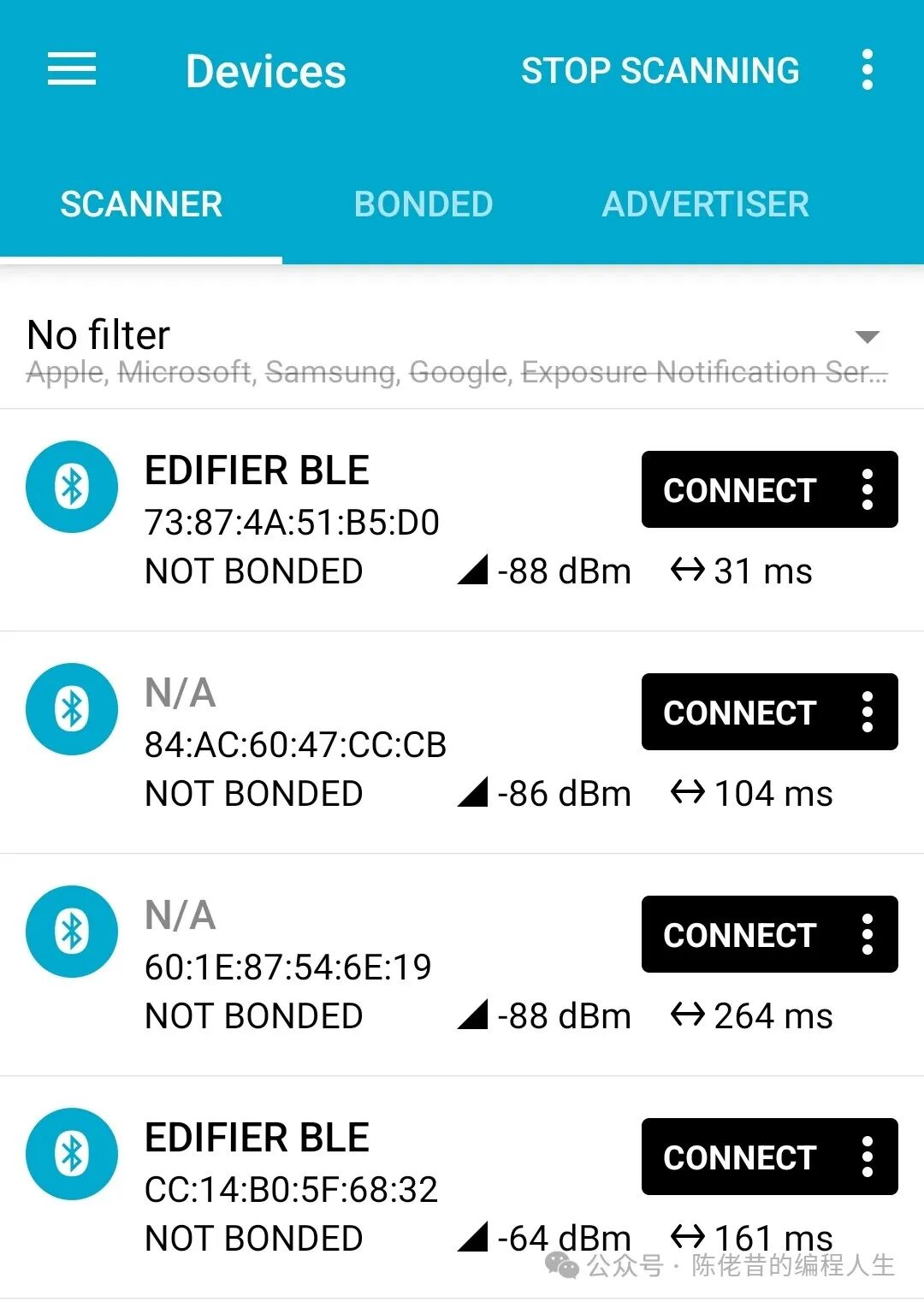
- SCANNER is the scanner, and it scans for nearby devices. You can choose to connect or bond.
- BONDED lists devices that are already bonded.
After you tap Connect, a new tab opens showing the currently connected device.
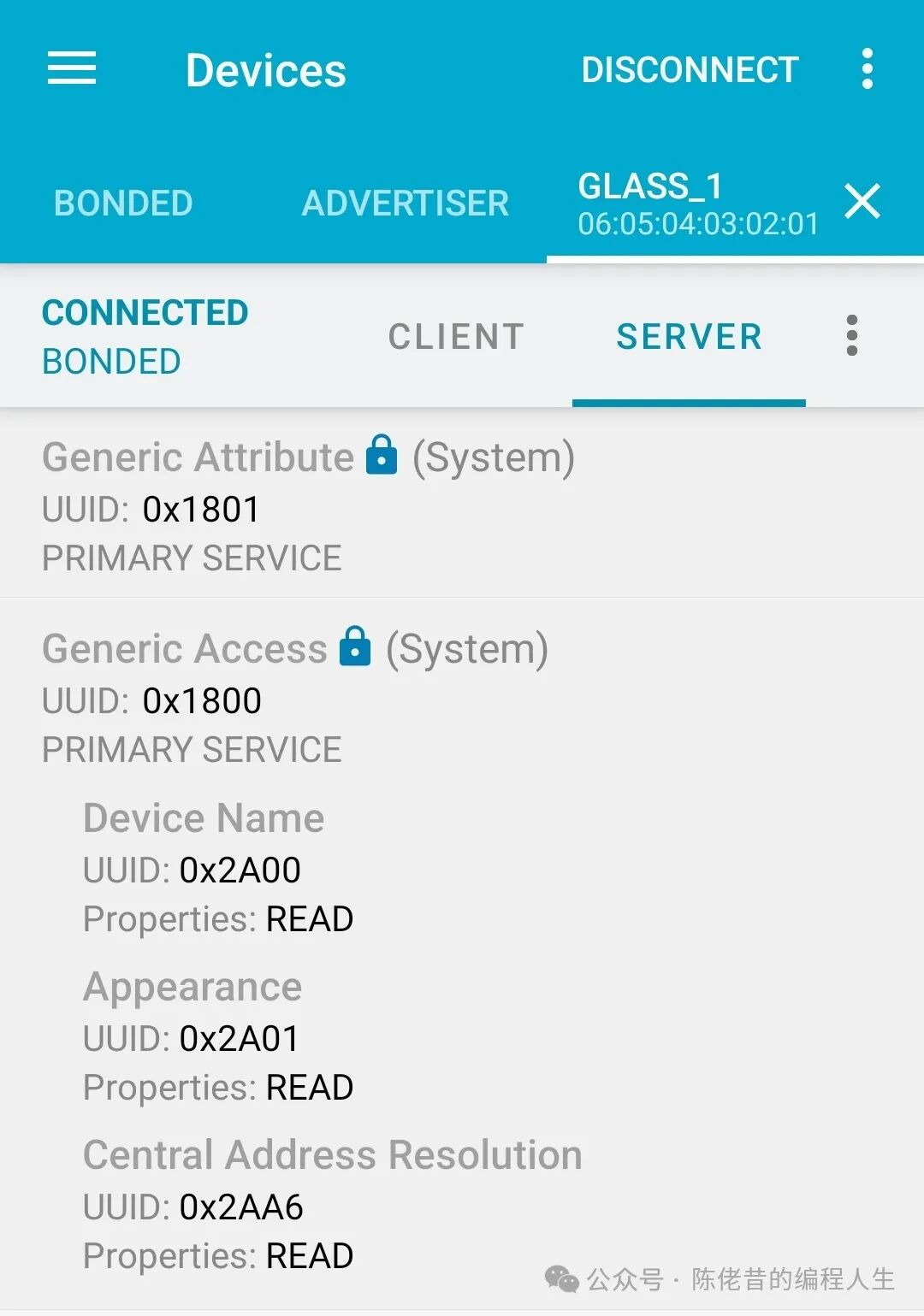
Under the currently connected device, you can see its related services as a Client and as a Server. Tapping a service shows the characteristics under that service. Since we're the initiating side, we need to interact with the device as a Client.
Characteristic permissions (Properties)
The Properties under a characteristic are that characteristic's permissions:
Notify
Notification permission; you must enable it first before you can receive its messages.
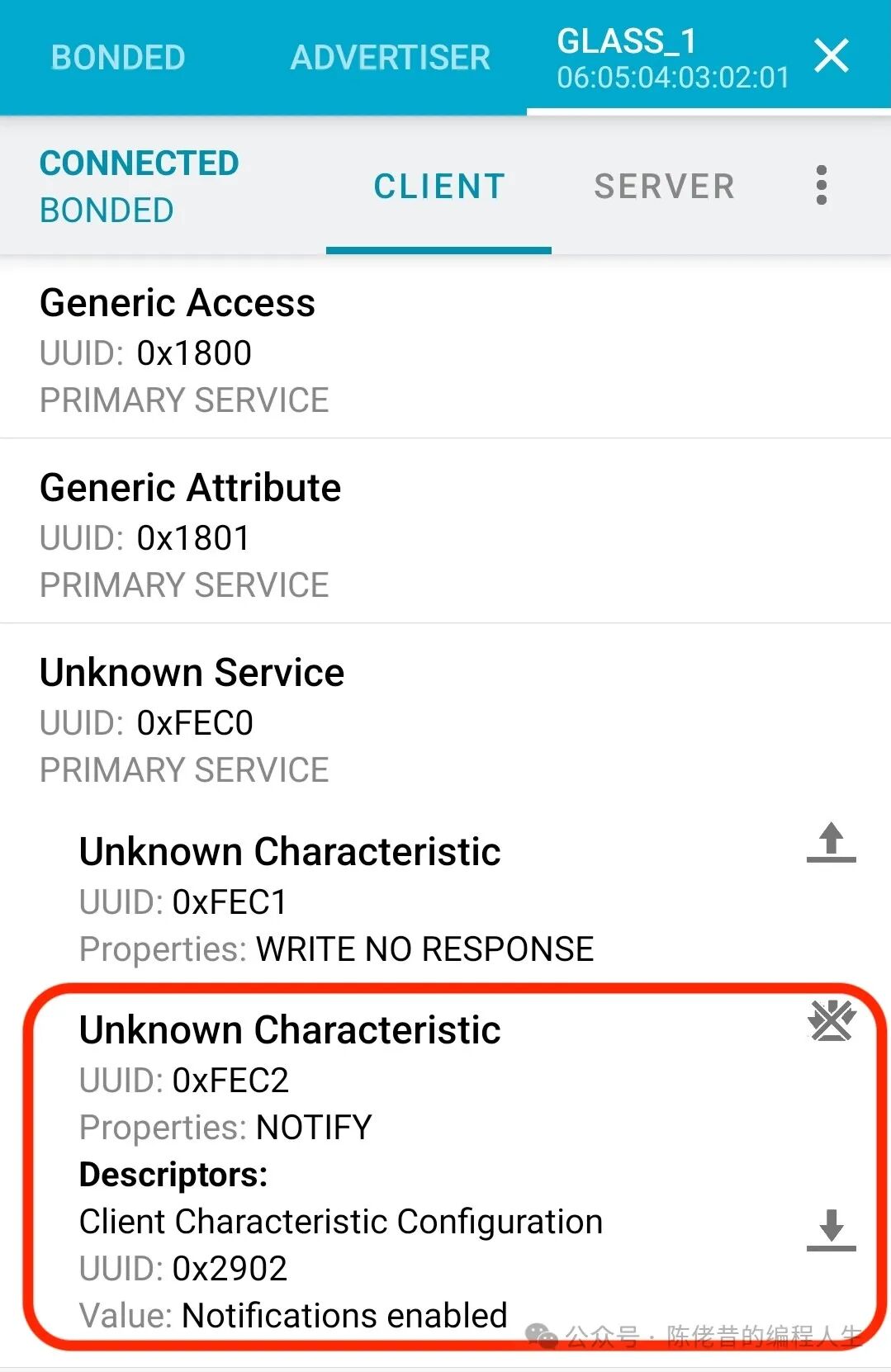
Tap the three arrows on the right to toggle the enabled state.
Indicate
Indication permission, similar to notify, but it requires acknowledgement.
Read
Read-only permission; you can't perform operations.
Write
Write permission, which can be further broken down:
- Write Request: the client can use Write Request to write a characteristic value, and the server responds with a Write Response to confirm the write operation.
- Write without Response / Write Command: the client can use Write without Response / Write Command to write a characteristic value, and the server does not send any acknowledgement.
- Signed Write Command: the client can use Signed Write Command to write a characteristic value; this requires a signature to verify the client's identity, which adds security.
- Queued Write: allows the client to queue multiple write operations and then send them to the server all at once, which helps reduce communication overhead.
If you write via Write without Response / Write Command, some hardware sends the response back over Notify; in that case you need to listen for the Notify return value.
Tap the send arrow to the right of the write permission, and a dialog for the write value appears, where you can send hex content to the device. The supported types you can choose from include byte array, byte, UTF-8, and so on.
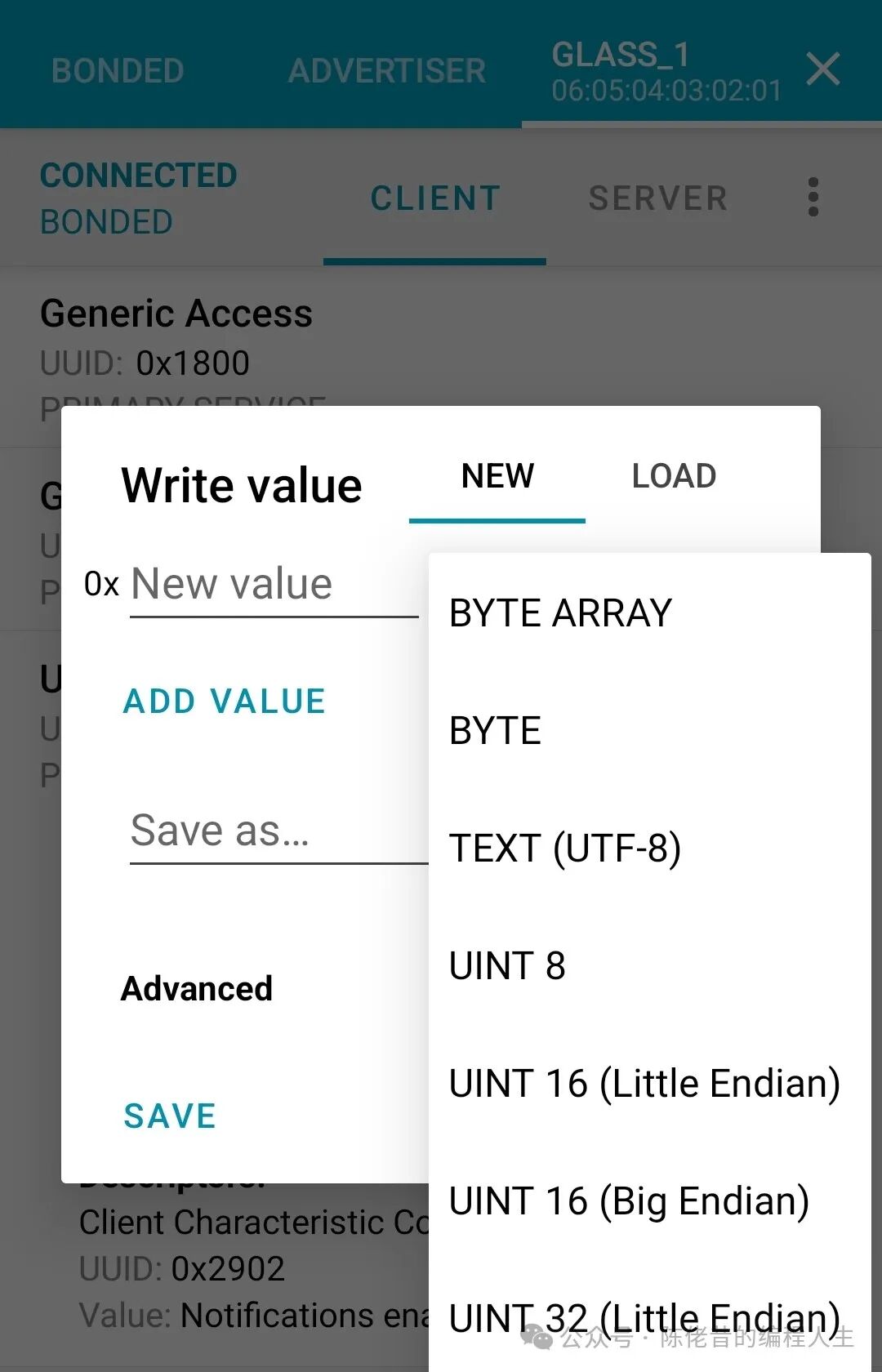
During development, you can compare the results of messages sent by nRF Connect to check whether your app is sending correctly.
Bluetooth development
The Bluetooth module ecosystem is fairly mature, and every client platform now has relevant APIs / libraries.
Android native
- android.bluetooth: the official Bluetooth development package provided by Android, containing a series of classes and interfaces for controlling the Bluetooth A2DP profile, managing the Bluetooth adapter, communicating with remote Bluetooth devices, and so on.
iOS native
- CoreBluetooth.framework: Apple's official solution for communicating with Bluetooth Low Energy (BLE) devices. With this framework, developers can implement searching, connecting, and data exchange between iOS devices and Bluetooth devices.
If you find the native libraries complicated to work with, see whether an open-source library supports what you need—but the native open-source libraries are all fairly old right now, so you'll still need to write a test demo to confirm compatibility with new versions.
React Native
- react-native-ble-plx: a comprehensive and reliable React Native BLE library that supports observing the device's Bluetooth adapter state, scanning for BLE devices, connecting to peripherals, discovering services/characteristics, reading and writing characteristics, observing characteristic notifications/indications, reading RSSI, negotiating MTU, and iOS background modes.
- react-native-ble-manager: if react-native-ble-plx looks too complex, react-native-ble-manager offers another excellent choice. This tool supports all the major BLE features, such as scanning for devices, establishing connections, transmitting data, getting state-change notifications, and disconnecting
- react-native-bluetooth-classic: this library is designed specifically for React Native apps, aiming to solve the problem of iOS Bluetooth Classic (non-BLE) connections by providing a stable interface through the External Accessory framework.
A pitfall I've hit personally: React Native libraries only support passing messages as base64; if you need other formats, it's best to do it natively.
Flutter
In Flutter, there are several popular Bluetooth libraries you can use to implement Bluetooth communication; here are some of the main ones:
- flutter_blue: a Bluetooth plugin that helps developers build modern multi-platform apps. It supports scanning for and connecting to nearby Bluetooth devices and interacting with them.
- flutter_blue_plus: a Bluetooth Low Energy plugin that evolved from FlutterBlue, supporting the BLE central role (the most common). If you need the BLE peripheral role, you may want to look at FlutterBlePeripheral or bluetooth_low_energy.
- universal_ble: a cross-platform (Android / iOS / macOS / Windows / Linux / Web) Bluetooth Low Energy (BLE) plugin that supports scanning, connecting, discovering services, reading and writing data, pairing, and more.
Electron
- Web Bluetooth API: Electron supports the Web Bluetooth API, which allows communication with Bluetooth devices. Developers need to handle the
select-bluetooth-deviceevent and possibly Bluetooth pairing.
Summary
Bluetooth technology is divided into Bluetooth Classic and Bluetooth Low Energy (BLE). The latter supports small-data transmission for smart devices, and Bluetooth Low Energy was introduced starting with Bluetooth 4.0, while positioning services were introduced in 5.1. Modern apps need to request location permission when using BLE scanning in order to improve accuracy.
Communicating with Bluetooth requires obtaining services, and the characteristics within those services, via UUIDs in order to implement data read, write, and notification functions.
For different platforms, there are various open-source libraries supporting Bluetooth development, such as React Native's react-native-ble-plx and Flutter's flutter_blue. These tools simplify the development process and provide a broad set of APIs for interacting with Bluetooth devices.