Goodbye, Single Framework: How AI Frees Up Front-End Technology Choices
In the era of AI-assisted programming, front-end developers are no longer bound to a single framework. This article takes a close look at three technology-selection strategies — getting more out of a familiar stack, leaning on the community ecosystem, and embracing native performance — and uses real-world experience to show how AI empowers cross-framework development.

Once you code with AI, how do you choose a framework?
With AI-assisted programming tools becoming widespread, front-end developers have gained unprecedented flexibility in choosing a framework, but at the same time they face new dimensions to weigh.
Here is a detailed analysis of three common approaches:
- Choose what you already know: balancing efficiency and limitations
Choosing a familiar framework is always a developer's first instinct.
The advantages of this choice are obvious:
Maximum development efficiency: You can throw together a project structure quickly without consulting the docs. A front-end developer who knows Vite, for instance, can configure the basic skeleton of a Vue/React project in minutes;
npm create vite@latest my-vue3-app --template vue
cd my-vue3-app
npm install
Efficient troubleshooting: When you hit a bizarre bug, experience lets you pinpoint the problem fast. Take Vue's lost reactivity in data — a veteran sees it and knows to check how the computed property is implemented, and in Vue 3 it may also be misuse of reactive;
let data = reactive({ name: "", age: "" });
let res = await getUserApi();
data = res.data; // 错误:直接赋值会丢失响应式
data.userData = res.data; // 正确:保持响应式
Controllable code quality: During code review you can spot potential problems sharply, such as the classic missing dependency array in React's useEffect.
useEffect(() => {
  console.log(coumt)
}, []); // 在代码复杂的情况下,很可能会遗漏依赖项 count
But trying to solve all-platform problems with a single framework is bound to run into performance issues. Take building desktop apps with Electron + HTML: it is simple, but memory consumption is hard to avoid.
What's more, if you stay forever in the stack you already know and don't use AI to learn new technologies early, your technical growth will lag behind others, and you will gradually fall behind in the competition.
- Choose the best community support: standing on the shoulders of giants
If you want to take a step forward, you can start looking at frameworks with a strong community ecosystem — you can learn a bit of all three major front-end frameworks. If you used Vue before, try React or Angular, or take the chance to shore up your TypeScript.
The benefit is that your problem-solving efficiency won't be lower than with the framework you know.
React, for example, has far more Stack Overflow questions and resolved GitHub issues than Vue. You just need to use AI translation well to find solutions online quickly.
And learning resources are plentiful too.
Also taking React as an example, the official documentation supports 7 languages; there are 1,000+ tutorial videos on Bilibili; and the npm plugins are enough to let you finish most enterprise projects without reinventing the wheel.
Based on these first two points, AI coding has another advantage: AI is smarter when it has more material to work with.
When you develop with React + TypeScript you can feel this quite clearly — the solutions it gives are more sensible, the code is more usable, and it can automatically fix TypeScript, so the code is more robust.
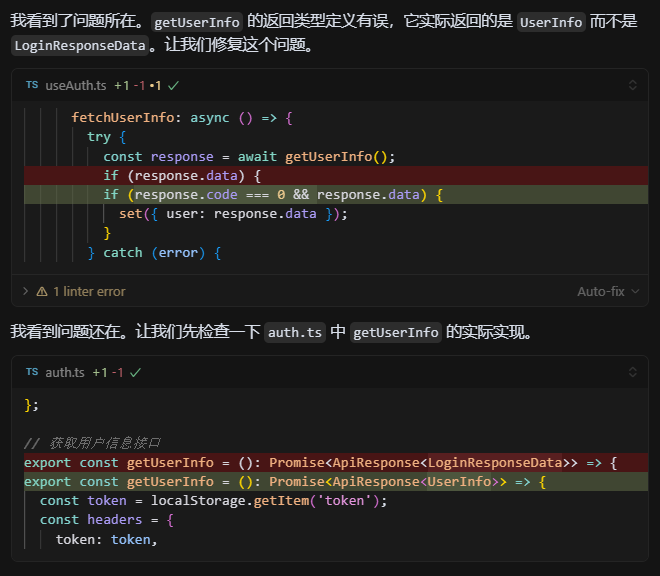
Figure: cursor automatically fixes type errors
But note that you shouldn't make the final technology choice on the community dimension alone.
In emerging fields, the community may be small but the potential greater — Rust + Wasm, for instance, may be worth considering if you need something more low-level and more extreme. And some enterprise frameworks have a steep learning curve but a more complete type system — AngularJS, for example, can be used in a team that is comfortable with object-oriented programming.
- Choose native: the trade-off between performance and maintenance
For mobile development, React Native used to be the only option. But if you're coding with AI, I'd recommend trying the native language instead.
Native development has advantages nothing else can replace:
Native leaves lots of room for performance optimization:
- In complex scenarios, even Flutter + native can deliver 60fps animation, while React Native may only reach 45fps.
- Native apps start up on average 300ms faster than cross-platform solutions
Better adaptation to new technologies:
- Same-day support for new iOS features (such as Live Activities)
- Direct calls to platform-specific APIs (Android's WorkManager)
If you're already a front-end veteran, you can use this approach even for cross-platform requirements.
If you're familiar with iOS's declarative UI, you can use Flutter + native; if you know Android, you can use kotlin multiplatform to share most of the code.
Or, without using these frameworks at all, you can set up a Monorepo project and lay out the directories the way these frameworks do — except your iOS folder and Android folder are generated by AI.
根目录
- 公共配置
- iOS
- Android
After you create the project sub-folders with Android Studio and Xcode, you can start coding with AI.
Once AI has generated the Swift code, ask it to "convert it to an equivalent Kotlin implementation, taking Android platform characteristics into account." Why the second half of that sentence? Because every language has different data structures, and it is still very necessary to rethink the code according to platform characteristics.
If you're still uneasy, before you start you can also have AI output a detailed design based on the language's characteristics, then edit it yourself.
Personal experience
In my practice with AI coding, I've tried all three approaches above.
In my experience, when you're only half-good at React, iOS and Android, React Native does not actually solve fewer problems for multi-platform development than using iOS and Android at the same time.
Developing with React Native is smooth, but the compile stage is another story. A preview that looks fine doesn't mean the app runs fine on a real device. Just when you think it will compile cleanly, plenty of bugs show up. And Expo's online build gives you limited control; building locally is the better choice.
If you've never used iOS or Android before, you'll face plenty of difficulties too.
With native development, debugging two codebases at once early on is indeed a hassle, but you see the results immediately, and the odds of packaging errors later are much lower.
So each approach has its pros and cons, and both are worth considering.
Conclusion
All in all, front-end developers in the AI era really do have a wider range of framework choices. With AI-assisted tools, developers can quickly grasp the core features of several frameworks, and can even maintain projects on three different stacks — Vue, iOS and Android — at the same time.
After all, a framework is just a tool; the real value lies in solving business problems efficiently at the lowest cost.
The greatest liberation AI brings is letting us adjust our tech stack as flexibly as a game character changing equipment.
Suppose your project needs a refactor right now — faced with an AI assistant that can handle 80% of the work automatically, would you boldly try Angular, which you're not familiar with, or even the emerging Svelte 5?
Feel free to leave your thoughts in the comments and let's talk it over.