A Week with opencode Made Me Drop Claude Code
After a week of trying opencode, my conclusion is this: OpenCode is fully capable of being a drop-in replacement for Claude Code, and in some ways the experience is even better.
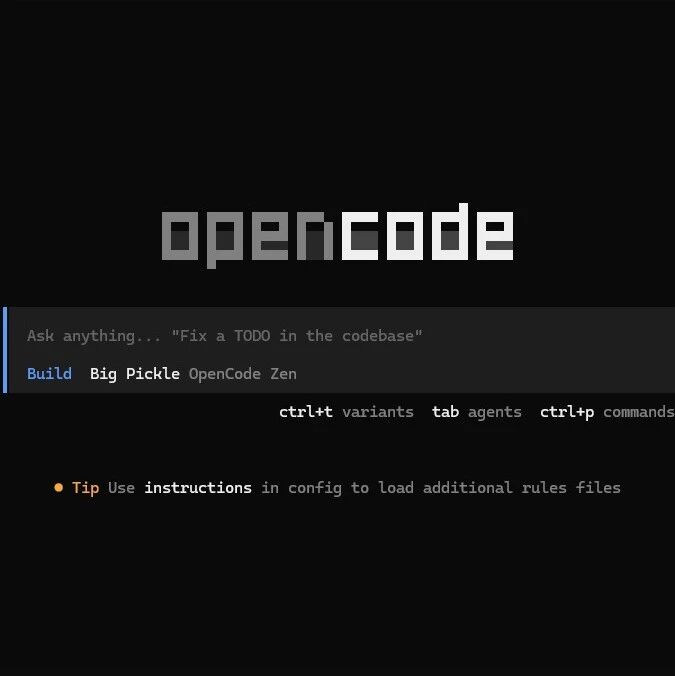
Riding the buzz around Claude Code blocking third-party tools, OpenCode had a real moment in the spotlight. I waited for that wave to pass before slowly starting my own trial — I wanted to steer clear of the emotional filter and see how much it's really worth.
Over that week I mainly used it for two jobs: building an Apple app, and working on an e-commerce project.
Honestly, the Apple app experience was unremarkable. Nothing about it blew me away. But when I moved to the e-commerce project, the picture changed completely — using nothing but the most basic "Plan" mode, development was actually faster than with Claude Code!

Something didn't add up. So I went and dug through the docs. Well, well — OpenCode ships with a secret weapon: LSP (Language Server Protocol). With that, writing code goes from "eyes shut, typing blind, pure guesswork" to "holding a map, navigating precisely." Efficiency takes off.
That said, the LSP support OpenCode bundles only covers a limited set of languages. Which explains why the Apple app project, where Swift support is only so-so, felt less smooth than the TypeScript-based e-commerce project.
(Incidentally, Claude Code does support LSP too, but you have to install it manually, and judging by other bloggers' test videos from the past two weeks, those calls don't succeed very reliably.)
What surprised me more is that everything Claude Code prides itself on — Commands, Skills, Agents — OpenCode has all of it. Just copy the config files over and you switch without a seam. Even if you change nothing, OpenCode keeps them compatible.
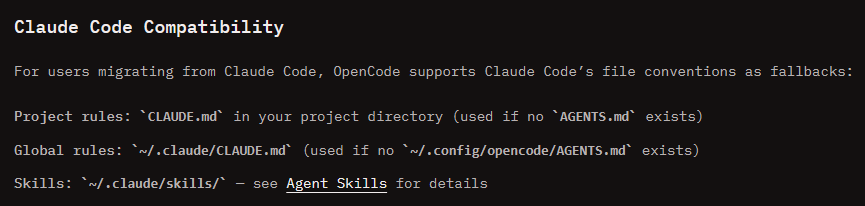
Claude Code's blocking move actually exposed its own anxiety, and it proved that building an Agent isn't such a high bar after all. That "close the borders" play ended up being a perfect piece of free publicity for OpenCode.
After a week of trial, my conclusion is: OpenCode is fully capable of being a drop-in replacement for Claude Code, and in some ways the experience is even better.
If you're interested, the tutorial below covers how to install and use it:
0. Environment setup
opencode requires Node.js 22+
Enter the following command in the terminal; any version number above 22 is fine:
node -v
If it's already installed and the version is right, move on to the next step.
If you need to install or upgrade, download and install the latest version of Node.js from https://nodejs.org/zh-cn/download.
1. Installing opencode
Skip this if it's already installed.
If it isn't, you can install it from the command line:
npm i -g opencode-ai@latest
Besides the command-line tool, opencode also offers a plugin and a desktop app.
Desktop app
For product managers or ordinary people with zero development experience, the desktop version is the best option. Being able to use a mouse makes the whole thing much simpler. The steps below use the desktop app as the example. Recommended!
Download link: https://opencode.ai/download
Under OpenCode Desktop (Beta), pick the installer that matches your operating system.
Plugin installation
For programmers who still need to look at code, search for opencode in your IDE's plugin marketplace and install it.

2. Subscribe to an LLM coding plan
OpenCode is pretty free-spirited — a regular LLM API works too. But I'd still recommend a model that supports a Coding Plan. Coding tools use a lot, and a normal API can get burned through fast.
Inside China, I'd recommend the Coding Plan packages from GLM or MiniMax. Which one to buy is your call. You can also subscribe to both for a month to try them out and cancel later. Start with the cheapest plan and upgrade only when you need to.
MiniMax
Starter ¥29/month, Plus ¥49/month, Max ¥119/month. Subscribe here:
https://platform.minimaxi.com/subscribe/coding-plan
GLM
Lite ¥40/month, Pro ¥200/month, Max ¥400/month, with the first month at half price right now. Subscribe here:
https://bigmodel.cn/glm-coding
3. Getting an API Key
Once you've subscribed, go to the official site and copy your API Key. The following uses the MiniMax China site as an example.
Go to the official site, log in, open account management, and click Coding Plan under "Subscription Management" in the left-hand menu.
The page that appears shows your API Key.
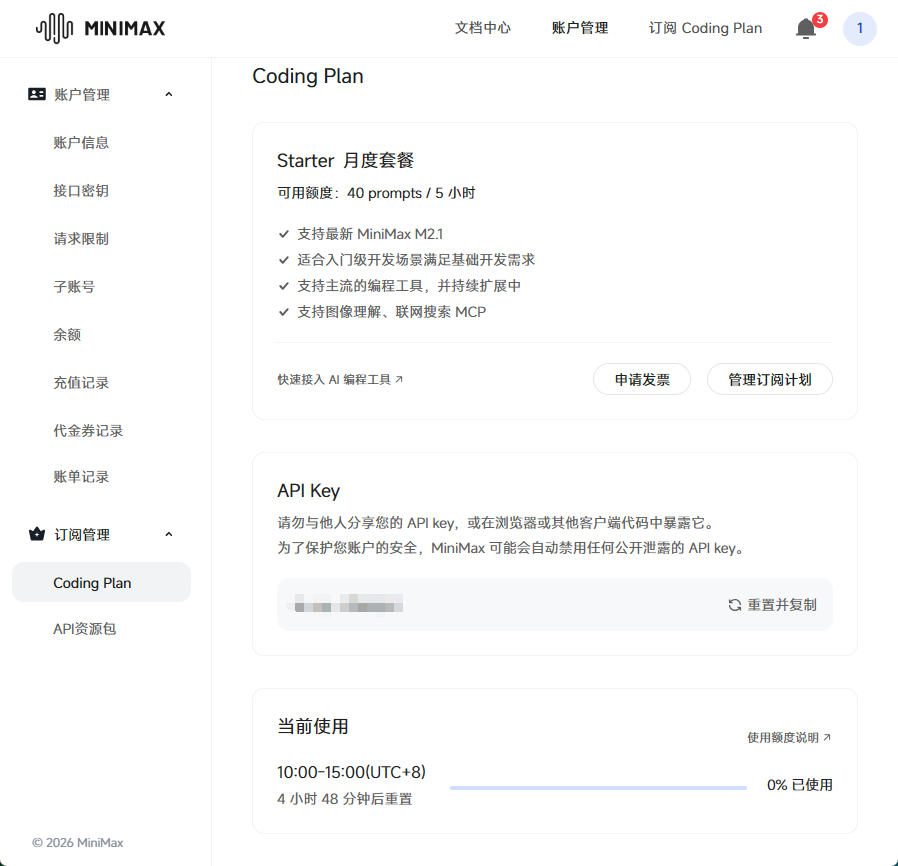
Just click "Reset and Copy."
4. Getting started
OpenCode works project by project. You can start by picking a folder or creating a new one — either is fine.
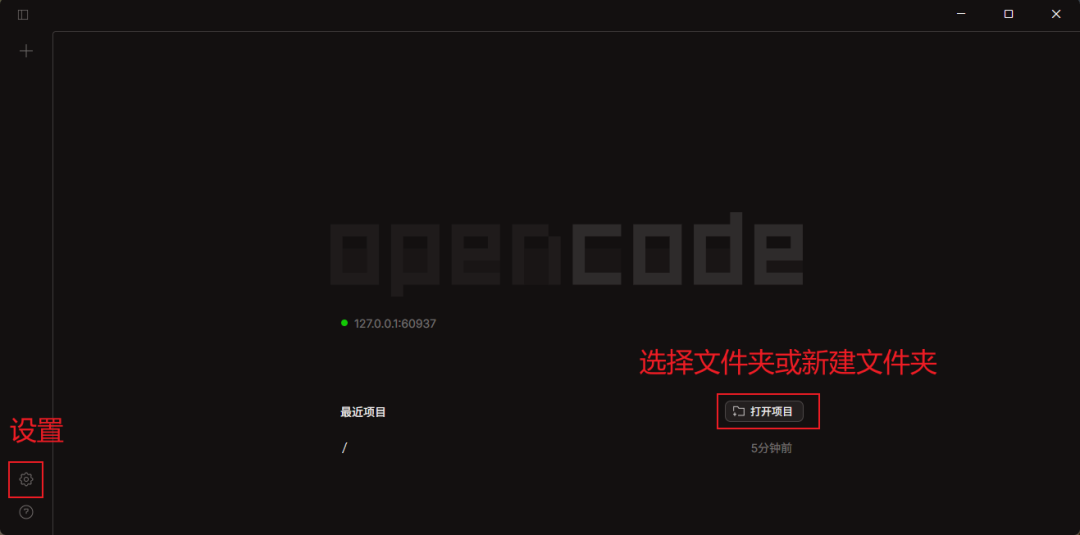
OpenCode also displays its interface based on your system language. If it doesn't come up in Chinese, you can change that in settings.
Settings also offer more than ten themes to choose from. If you don't like a dark interface, try another one.
5. Connecting a model
Connecting a model in opencode is simpler than in Claude Code.
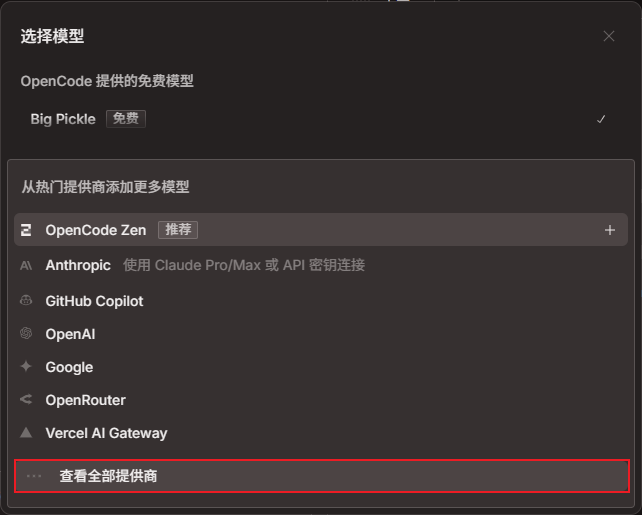
Once you're in the project view, click the current model in the chat box and a model picker pops up.
opencode has more than 60 LLM providers built in. Click "View all providers" and you'll see the Chinese ones — beyond the GLM and MiniMax mentioned above, there's also Alibaba, DeepSeek, Z.AI, Moonshot, and more.
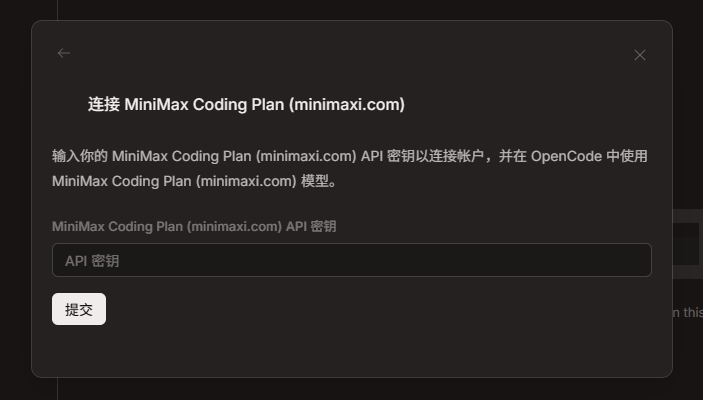
In most cases you just paste in the API key you copied from the provider in the previous step. (For MiniMax, mind the China versus international site.)
Once it's configured, have a normal conversation in the chat box — if you get a reply, it worked!
6. The basics
Agents
There are currently two Agents and two SubAgents:
- Build, the default Agent, used for reading, editing, and handling files
- Plan, the planning Agent, which helps you plan complex tasks
- General, invoked with @general, which researches complex problems and carries out multi-step tasks
- Explore, invoked with @explore, which does simple lookups, reads code, and answers questions
Tools
opencode doesn't slice tools up that finely — skills and commands are just another kind of tool. They're all invoked the same way, with /具体工具.
There are two ways to install skills/commands:
Method one: copy the contents of the skills folder into .opencode/skills, or under .opencode/commands;
Method two: use the official method provided for skills/commands, or hand the official conversation message over to opencode.
One library built specifically for development with OpenCode that I'd recommend:
https://github.com/code-yeongyu/oh-my-opencode
Command line
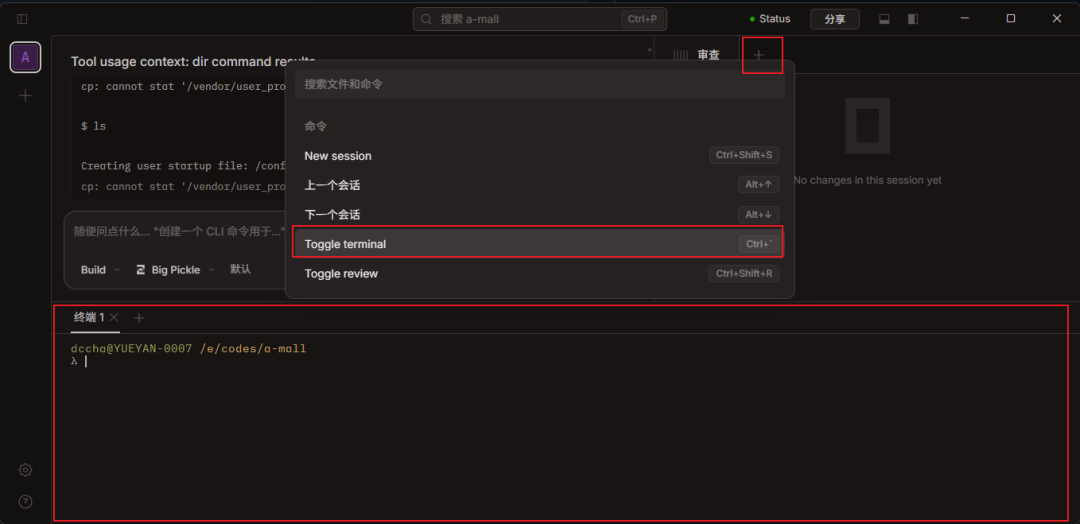
You can type ! to switch into command-line mode, then enter a shell command directly and it will run.
You can also open an extra terminal window, which is more convenient to work in.
For other usage, see the official docs:
7. The advanced play: coding anywhere, anytime
Other people's setups are genuinely mind-expanding:
Because opencode can run as a web server, you can deploy opencode on a server and then access it from your phone.
That gives you an opencode you operate from your phone. Programming is no longer tied to your computer, and you've got an AI coding assistant that helps you develop wherever you are.

And you can use your phone's voice input to do real Vibe Coding.
You could say the open-source community has massively unleashed everyone's creativity!